SAP Testing Process: A Complete Step-by-Step Guide for 2026

 KiwiQA
Table of Contents
SAP systems support complex business operations across industries. As organizations adopt SAP S/4HANA, cloud platforms, and connected apps, testing becomes crucial for managing reliable business processes and data flows. Inadequate testing can lead to integration failures, incorrect data, performance errors, and costly production errors. The recent survey by Gartner shows 75% of ERP strategies aren’t strongly aligned with overall business strategy, leading to confusion.
A structured SAP Testing Process led by an experienced SAP testing company helps firms identify risks during implementation, migration, and upgrades before they impact production. Learn in this blog where we explain the testing types, key stages, metrics, automation trends, and effective SAP testing services.
The process of verifying that SAP applications, configurations, custom developments, integrations, and business workflows function as intended is known as SAP testing. SAP testing places a strong emphasis on integrating enterprise processes and data flows, in contrast to traditional software testing. SAP testing companies assist organizations in confirming that SAP supports precise, dependable, and continuous business operations by verifying entire business scenarios across modules and external systems.
SAP testing solutions assist companies in maintaining data accuracy, reducing production defects, validating integrations, safeguarding business-critical processes, and improving system reliability. By identifying functional, data, performance, and integration issues prior to go-live, it also lowers the risks associated with SAP implementations, upgrades, and migrations. Businesses are more confident that SAP processes will function properly and support continuous daily operations when they undergo thorough testing.
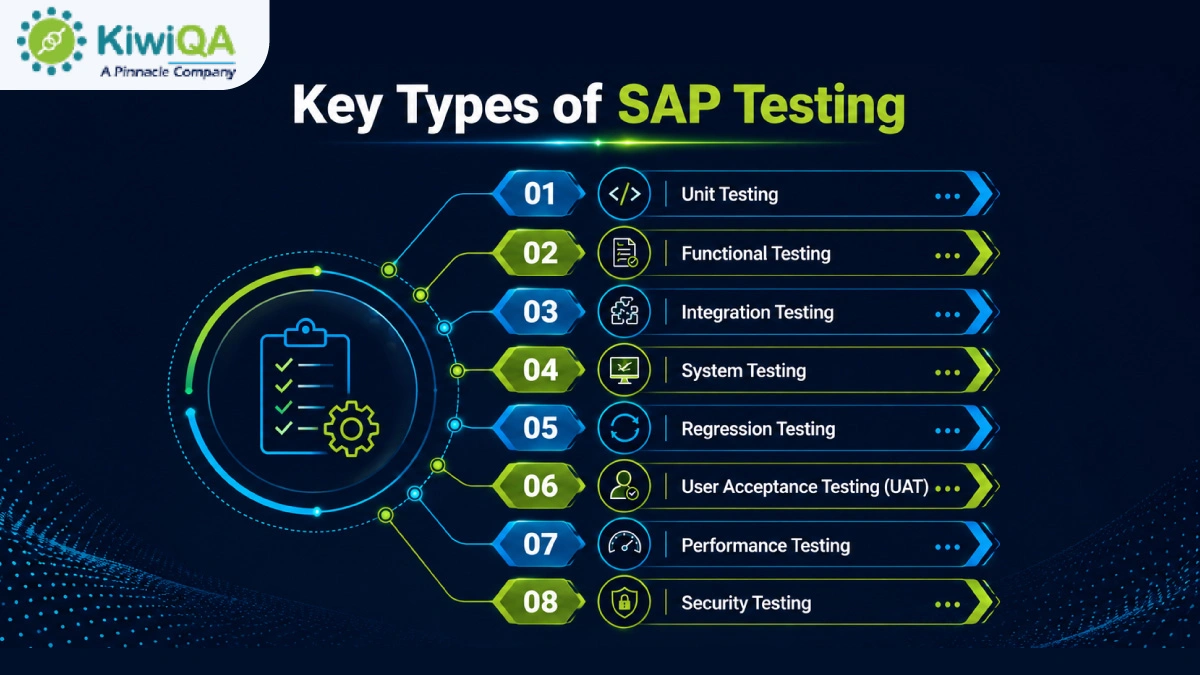
Before they are integrated with other components, individual SAP configurations, developments, custom code, reports, interfaces, or objects are the focus of unit testing. Developers or testers confirm that every component operates according to its technical specifications and produces the desired outcomes. Finding flaws early on reduces the amount of work needed during subsequent testing stages. It helps to stop minor coding or configuration problems from impacting more significant business processes.
Functional SAP testing services assess whether SAP modules and functions operate according to specified business requirements. Based on anticipated business rules and results, testers verify procedures. This testing verifies that configured SAP functionality supports intended operations and appropriately manages various business conditions. It assists in identifying gaps between the documented functional requirements and the implemented solution.
Integration testing of SAP solutions confirms that information is correctly exchanged between SAP modules and related applications. In addition to external systems, APIs, middleware, and third-party applications, testers verify data flows between departments like sales, finance, procurement, and inventory. The goal is to verify that dependent processes function as intended and that transactions flow across system boundaries with accuracy. This helps in identifying problems with interfaces, mapping, synchronization, and data transfer.
Instead of testing individual components separately, system testing assesses the SAP environment as a whole. In compliance with specified requirements, testers verify integrated functionality, configurations, interfaces, workflows, and system behavior. To determine whether various components function properly under realistic circumstances, end-to-end business scenarios are performed.
Regression testing verifies that SAP’s current functionality is still functional following upgrades, patches, configuration updates, and custom code changes. To find unexpected effects on established business processes, testers rerun suitable scenarios. Particular attention should be given to critical workflows and frequently used transactions. Particularly in large SAP environments with frequent releases and interconnected processes, automating repetitive regression scenarios can increase execution speed and consistency.
From the viewpoint of its intended users, user acceptance testing establishes whether SAP satisfies realistic business requirements. Business teams test whether the system supports anticipated results by running realistic scenarios similar to their everyday operations. Users record process problems, functional gaps, and other issues so they can be fixed.
Performance SAP automation testing company assesses how SAP reacts to various workload scenarios and whether the system maintains stability as transaction volumes rise. Response times, throughput, resource usage, and system behavior under typical, peak, and stressful circumstances are all measured by testers. High-volume procedures and crucial transactions should be given priority. Teams can increase reliability for production users by using performance testing to find errors prior to deployment.
Security testing evaluates how well SAP protects business data and limits system access based on roles and authorizations. While searching for possible security flaws, testers confirm user permissions, access controls, and authentication procedures. Testing should also take into account whether users have access to features or data that are outside of their control. Prior to production deployment, comprehensive SAP testing solutions assist organizations in identifying access risks and improving SAP security.
The first step is to go through the business and functional requirements that specify how the SAP solution must function. Determine which SAP business processes are essential, such as workflows that have a direct impact on revenue, customers, finance, the supply chain, or employees.
To comprehend possible testing impacts, examine integrations and dependencies with other SAP modules and external applications. Clearly define the acceptance criteria and anticipated business results. This foundation ensures that test activities stay in line with organizational goals, helps testing teams concentrate on business-critical functionality, and minimizes coverage gaps.
Before creating complex test activities, clearly define the testing scope. Determine which SAP modules, applications, and business functions need to be validated in accordance with project goals and risk levels. Identify the essential workflows that must function properly in all integrated processes.
Incorporate middleware, interfaces, APIs, and external systems that communicate with SAP. To avoid misunderstandings during execution, the team should clearly document both in-scope and out-of-scope areas. Teams can prioritize high-risk functionality, allocate resources efficiently, and maintain consistency throughout the SAP project with the support of a clearly defined scope.
An SAP testing process outlines how the testing procedure will be carried out and managed during the project. Determine testing goals first, taking into account project requirements, system complexity, and business risks. Select the best QA types that are functional, integration, performance, and security.
Environments, automation opportunities, roles, entry and exit requirements, and defect-management protocols should all be specified in the strategy. Teams can prioritize high-risk procedures, make effective use of resources, and maintain uniform testing coverage across SAP modules and integrations with the support of a clear strategy.
Also Read : Top 10 SAP Testing Company in US Delivering End-to-End SAP Quality Assurance
The SAP business process automation testing strategy is converted into a workable schedule of responsibilities and tasks by the SAP test plan. It should outline what will be tested, when testing will take place, who will carry out each task, and what environments or tools will be required.
Dependencies between SAP modules, integrations, test data, and business users should all be taken into consideration in the plan. Incorporate risk-management and reporting protocols so that interested parties can keep an eye on developments and address any delays or serious flaws. A thorough test plan offers a methodical way to organize testing from planning to final validation.
The configuration and integrations that the system will use in production should be closely mirrored in the SAP testing environment. Before execution starts, testers set up the necessary SAP modules, interfaces, databases, middleware, and related apps. To make sure data can transfer between SAP and external systems properly, system connectivity needs to be verified.
Incorrect permissions can prevent valid test execution or reveal security flaws, so user roles and authorizations must also be verified. Early environment preparation helps in differentiating issues resulting from configuration, connectivity, access, or infrastructure from actual application flaws.
The business conditions that users will face in production should be accurately reflected in SAP test data. For procedures like order management, procurement, finance, and inventory, testers create master data, transactional records, and scenario-specific datasets. To confirm how SAP manages expected and exception conditions, both valid and invalid data should be included. Regression testing can be made quicker and more reliable by using an SAP automation testing company to automate the creation of test data for repetitive scenarios.
SAP test cases should convert business requirements into verifiable, executable conditions. Create end-to-end scenarios that represent entire business processes after beginning with individual functions. Every test case should specify the requirements, test data, execution procedures, and anticipated outcomes. Additionally, traceability, which enables teams to assess whether crucial business functionality has been sufficiently tested, is provided by connecting test cases to requirements.
Testers run authorized scenarios against the configured SAP environment during test execution, comparing actual system behavior with expected outcomes. According to the project’s reporting guidelines, each test should be marked as passed, failed, blocked, or something else. Testers should record relevant documentation, such as screenshots, transaction details, logs, or error messages, whenever a failure happens. The planned scope and timeline should be used to monitor testing progress. Failures are simpler to recreate, look into, and share with developers, SAP consultants, and business stakeholders thanks to this methodical approach.
Defects in SAP should be recorded so that technical teams can comprehend and reproduce the issue. The impacted process, test results, steps to reproduce the problem, expected behavior, actual behavior, and supporting documentation should all be included in a defect record. Then, defects can be categorized based on business priority and severity.
Determining whether a problem comes from configuration, custom development, integrations, master data, authorizations, or another component is made easier with the help of root-cause analysis. By monitoring every defect through retesting and closure, unresolved problems are kept from being missed prior to deployment.
Regression testing confirms that SAP modifications have not unexpectedly impacted current functionality. Following configuration modifications, patches, updates to custom code, integrations, or defect fixes, it becomes especially crucial. Before rerunning relevant test cases, testers should determine which processes might be impacted by the change.
Changes involving interconnected modules should also incorporate critical end-to-end workflows. Regression scenarios that are frequently repeated can be automated to save human labor. Teams can find unexpected behavior before it reaches production by comparing current results with those from prior test cycles.
The purpose of user acceptance testing is to determine whether SAP meets the expectations and real business processes of its intended users. Using procedures and data that mirror daily operations, business representatives carry out realistic scenarios.
For example, supply-chain teams might test inventory procedures, while finance users might verify financial postings and reporting. Users document usability issues, process problems, or functional gaps that might not be found by technical testing alone. Before stakeholders formally accept and approve the system for production use, critical issues should be fixed and retested.
Additionally, SAP testing should verify that users can only use data that aligns with their roles and that the system maintains responsiveness under anticipated workloads. Response times under typical, peak, and high-volume circumstances can be assessed through performance testing, especially for crucial transactions and interfaces.
User roles, authorizations, access controls, and potential vulnerabilities should all be examined during security testing. By testing these areas, issues that might not show up during functional validation can be found. Before the system is deemed ready for deployment, performance and security results should be compared to specified requirements.
SAP testing reports combine execution results into data that stakeholders can use to evaluate go-live readiness and quality. In addition to defect counts and severity, reports usually display the number of test cases that were executed, passed, failed, blocked, and pending.
They should also highlight unresolved problems or risks and show that important business processes are covered. Teams should explain whether remaining defects could impact business operations instead of just reporting test-case numbers. It is easy for the stakeholders and project managers to evaluate whether the SAP solution is prepared for implementation.
Final sign-off confirms the SAP system’s compliance with the established testing and business acceptance standards. Stakeholders should examine any agreed-upon workarounds, critical-process outcomes, unresolved defects, and outstanding risks prior to approval.
Smoke testing should confirm crucial transactions, integrations, user access, and other crucial operations in the production environment after the system goes live. Performance problems can then be found through post-deployment monitoring. An extra layer of protection between successful pre-production testing and stable SAP operations following deployment is offered by this final validation.
🢣 Test case execution rate- It calculates the number of planned test cases that have been run during a given testing period.
🢣 Test coverage- It demonstrates the extent to which the specified SAP features, specifications, or business procedures have been tested.
🢣 Test pass percentage- It shows the proportion of test cases that are successfully completed and produce the desired outcomes.
🢣 Defect density- It counts the number of flaws found in a particular SAP function, module, or testing area.
🢣 Defect leakage- It monitors flaws found in production or after release that were overlooked during testing.
🢣 Defect resolution time- It calculates the typical time needed to look into, correct, retest, and close reported defects.
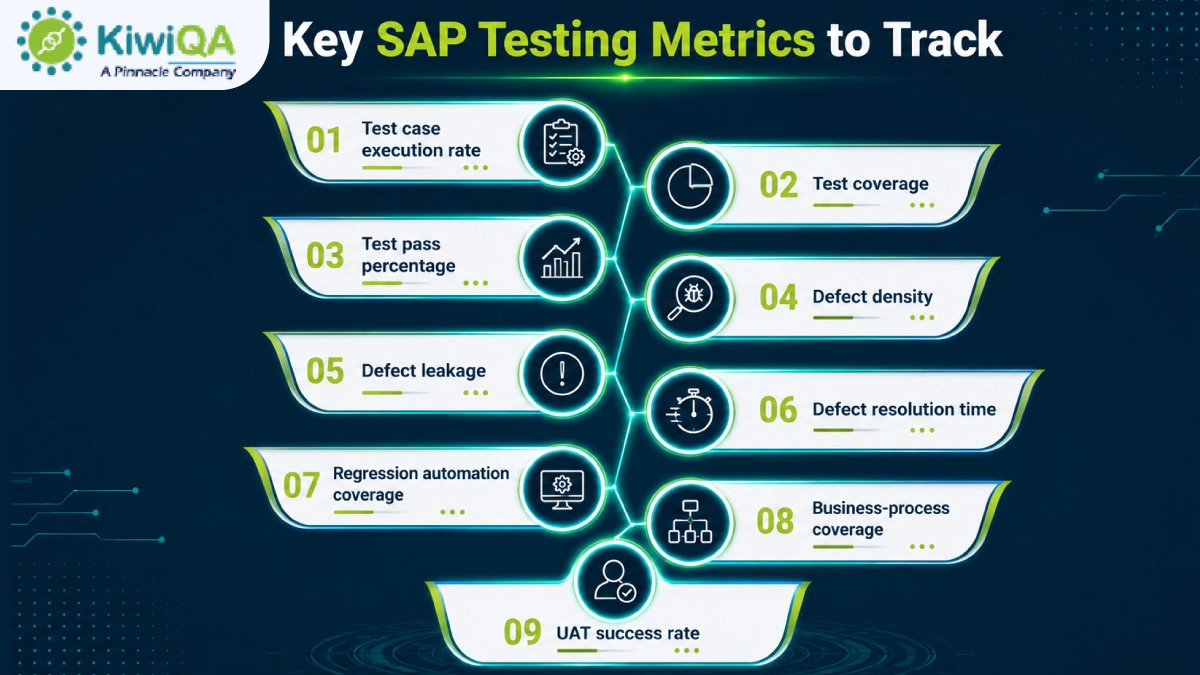
🢣 Regression automation coverage- It displays the percentage of regression test cases that are repeatable and automated.
🢣 Business-process coverage- It evaluates the degree to which crucial end-to-end business processes have been verified during SAP testing.
🢣 UAT success rate- It shows the proportion of user acceptance tests that business users have successfully approved.
AI can recommend appropriate test cases and scenarios by analyzing SAP requirements, business rules, and current documentation. This reduces manual tasks, increases coverage, and helps testers find missed conditions. AI-generated cases can then be reviewed and improved by human testers prior to execution.
Intelligent regression testing determines which SAP functions are most likely to be impacted by updates. Teams can prioritize high-risk scenarios rather than running every test that is available. This keeps coverage of crucial business processes while reducing unnecessary execution.
Self-healing automation can automatically modify test scripts to continue running when it detects specific changes in SAP interfaces or application components. When object properties or user interfaces change, this can reduce maintenance work.
To find SAP areas that might have a higher defect risk, predictive defect analysis uses past testing data, change patterns, and defect trends. These insights can be used by teams to prioritize testing resources, concentrate reviews on vulnerable stages, and conduct research into possible problems earlier in the testing lifecycle.
Also Read : A Complete SaaS Testing Approach for Modern Businesses
☢ SAP domain expertise- Select a partner who has demonstrated expertise with SAP modules, business procedures, configurations, and testing techniques.
☢ S/4HANA testing experience– Check if they have tested custom developments, migrations, upgrades, and S/4HANA implementations.
☢ Test automation capabilities– To increase testing efficiency, find out if they can automate regression, high-volume, and repetitive test scenarios.
☢ Industry knowledge- Choose a partner who is knowledgeable about the operational procedures, business priorities, compliance requirements, and industry workflows.
☢ Integration testing expertise– Make sure they are able to test dependencies and data flows between SAP modules, middleware, APIs, and external apps.
☢ Performance and security testing capabilities- Look for knowledge of SAP performance, scalability, user access, authorization, and security control validation.
☢ Test framework maturity– Determine whether the partner makes use of defined procedures, reusable resources, structured testing frameworks, and measurable quality standards.
☢ Reporting and governance approach- Select a partner who offers regular stakeholder communication, risk visibility, test metrics, defect reporting, and clear dashboards.
☢ Ability to support continuous testing– Give preference to partners who can support continuous validation across SAP releases, updates, and modifications and incorporate testing into CI/CD pipelines.

SAP performance depends on testing, which continues throughout the system lifecycle. SAP testing acts as the continuous business-risk validation process rather than final delivery. A structured SAP business process testing approach helps to protect critical processes, integrations, and user experience. Whether implementing, upgrading, or migrating SAP, choosing a skilled SAP testing company helps to establish scalable quality practices, minimize disruptions, and ensure the system remains reliable with changing business needs.

Join the like-minded community & get the latest updates and insights on software testing technological transformation around the globe. Don't miss out.