A Complete SaaS Testing Approach for Modern Businesses

 KiwiQA
Table of Contents
SaaS apps are necessary to modern business workflows. The requirement for premium, consistent software rises along with the desire for cloud-driven solutions. More than 40% of firms report losing more than $1 million annually due to poor software quality. SaaS testing measures that your service matches performance, functionality, and security. SaaS Testing Services makes sure your software is in optimal condition before release. Read the blog to know a structured approach for modern business.
The process of confirming that a Software-as-a-Service application operates accurately, efficiently, maintains security, and provides a consistent user experience is known as SaaS testing. SaaS testing company ensures the application satisfies business needs and customer expectations both before and after deployment. The testing is required for validating features, integrations, scalability, and reliability across various devices, browsers, and user environments.
To guarantee quick response times and stability, a robust SaaS testing strategy verifies application performance under various workloads. It keeps a dependable experience even during periods of high traffic by assisting in the early detection of slow pages, resource bottlenecks, and performance problems.
SaaS application testing assists in locating security flaws, confirming access controls across several tenants, and validating user permissions. Frequent testing lowers security risks, safeguards private client and company information, and guarantees adherence to data privacy laws and industry standards.
Testing boosts customer satisfaction and enhances long-term user retention by early detection of usability problems, broken workflows, and navigation issues.
Businesses can confidently release new features without affecting current functionality when they have a clear SaaS testing strategy. Automated and regression testing for continuous validation facilitates quicker deployments, enhances software quality, and lowers the possibility of production flaws following each update.

One of the most difficult aspects of SaaS security testing is multi-tenant architecture, which allows several clients to share an application while maintaining data isolation. To stop unwanted access, testing should confirm user permissions, secure data separation, and tenant-specific configurations. Additionally, QA teams must confirm that changes made do not impact other customers’ data, functionality, or performance.
Continuous testing is crucial because SaaS applications are updated often. In order to prevent defects from being introduced by new features and bug fixes, QA teams must manage shorter testing cycles while maintaining thorough regression coverage. Automated testing is essential for swiftly validating changes without postponing releases. A carefully planned testing procedure helps in maintaining software quality.
Third-party services like payment gateways, CRMs, analytics platforms, and communication tools are essential to the majority of SaaS applications. Validating APIs, data synchronization, authentication, and system responses in various scenarios are all part of testing these integrations. Additionally, QA teams need to assess how the application responds to slow or unavailable external services. Reliable integration testing guarantees continuous business operations and avoids data inconsistencies.
Compatibility testing is crucial because users access SaaS applications from a variety of browsers, devices, and OS. QA teams should confirm that desktop, tablet, and mobile platforms all have consistent functionality, layout, and performance. Prior to release, testing various screen sizes, browser versions, and operating systems helps in identifying display and usability issues. This guarantees that every customer, regardless of device, will have a smooth experience.
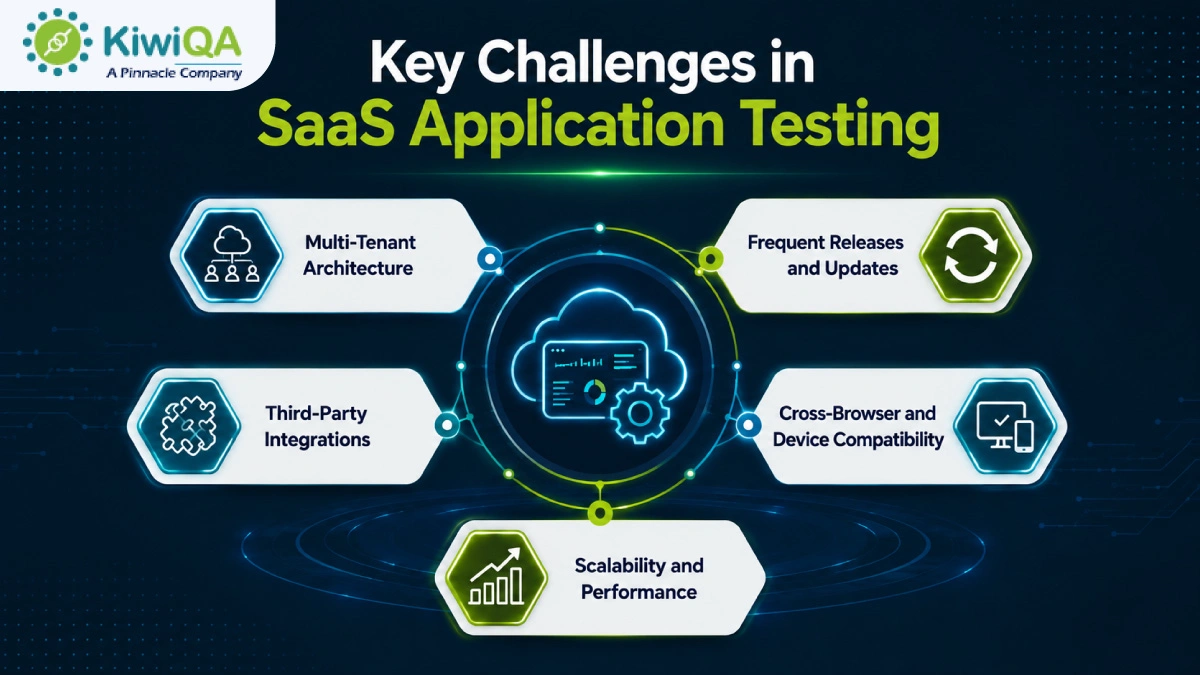
SaaS platforms must continue to provide quick performance as customer demand increases. To find bottlenecks before they impact production, SaaS application testing should mimic growing user traffic, massive datasets, and peak workloads. Assessing response times, resource usage, and infrastructure performance helps guarantee that the application scales effectively. Thorough scalability testing helps businesses expand while preserving a stable user experience.
Every effective SaaS testing approach procedure begins with a thorough comprehension of user expectations and business objectives. Determine the most important workflows in the application, examine various user roles and permissions, and specify the behavior of each feature. Pay attention to high-risk features that have an immediate effect on revenue or customers. This foundation assists QA teams in developing suitable test cases and guaranteeing that the application provides the anticipated business value.
A carefully thought-out testing strategy guarantees that each testing task is in line with the project’s goals. Determine which areas need automated or manual testing, specify testing environments, establish criteria for each testing phase, and set clear testing goals. Throughout the SDLC, an organized approach guarantees that the SaaS application is assessed consistently. It enhances collaboration and minimizes testing gaps.
Also Read : Best 11 SaaS Testing Companies in India (Edition 2026)
To produce accurate results, a trustworthy test environment should closely mimic the production setup. Before execution starts, set up test accounts, user roles, permissions, and realistic datasets. To properly validate application behavior, integrate all necessary testing tools and supporting systems. In addition to increasing testing accuracy and decreasing false failures, proper environment preparation helps in identifying environment-specific problems prior to deployment.
Well-designed test scenarios incorporate edge-case scenarios to verify how the application behaves in various scenarios. Give customer-critical processes like data processing, account management, and payments top priority. Reusable test cases increase productivity, facilitate regression testing, and lessen the work required for upcoming software releases.
Functional testing, the SaaS testing methodology, confirms that each feature operates in accordance with technical and business requirements. Verify critical features like billing, dashboards, reports, notifications, subscription management, user registration, and login. Verify that workflows work properly on various devices and user roles. Early detection of functional flaws increases application performance and guarantees that users encounter consistent, expected behavior across the platform.
Both these factors make a strong impact in modern SaaS applications. Check that data exchanges between connected systems, authentication, and API requests and responses function properly. Verify data accuracy, error management, and recovery procedures in the event that integrations are unsuccessful. Extensive integration testing guarantees that external services operate smoothly within the application ecosystem. It avoids communication problems and preserves data consistency.
Performance QA measures the app’s performance under traffic. To evaluate response times, resource usage, and system stability, conduct load, stress, and endurance testing. Determine whether the platform can effectively scale as customer demand rises and find issues with performance before they have an impact on users. This QA guarantees long-term business growth and steady performance.
Sensitive client and corporate data is protected from possible threats by security testing. Verify encryption, authorization, authentication, and safe data transfer throughout the application. Prior to release, identify potential attack points, misconfigurations, and vulnerabilities. Verify adherence to relevant industry rules and security guidelines. Frequent security testing lowers the possibility of expensive security incidents and increases customer trust.
Testing for usability and accessibility guarantees that the SaaS application is user-friendly for every client. Examine forms, buttons, interactive elements, navigation, and interface consistency across devices. Enhancing usability promotes user adoption and retention, along with customer satisfaction.
Regression testing makes sure that new updates don’t cause flaws in the functionality that already exists. To increase testing consistency and speed, automate high-priority and repetitive test cases. Include automated tests in CI/CD pipelines so that they run following each significant change to the code. Maintain automation scripts on a regular basis to keep them reliable, cut down on manual labor, and speed up software release cycles.
Before the application is deployed, SaaS user acceptance testing verifies that it satisfies actual business needs. Test real-world scenarios and business workflows with key customers, stakeholders, and business users. Obtain useful input, identify usability issues, and verify that the program meets functional requirements. A successful UAT lowers the possibility of post-release problems and boosts deployment confidence.
To preserve application quality, testing should continue even after deployment. Use real-time monitoring tools to maintain system availability, performance, failed transactions, and application errors. Examine production incidents and customer feedback to find areas for improvement. Maintaining software reliability, raising customer satisfaction, and supporting continuous product improvements can be obtained by regularly updating test cases.
Functional testing confirms that each feature of the application operates in accordance with the specified business requirements. To guarantee desired results, it assesses user workflows, system behavior, reports, and essential functionalities. This testing validates business logic across various scenarios and verifies that users can perform critical tasks without error. By guaranteeing consistent app performance, functional testing serves as the foundation of SaaS quality assurance.
Regression testing makes sure that updates, bug fixes, and new features don’t interfere with existing functionality. After each code change, QA teams review crucial workflows to find unforeseen flaws. Regression tests are performed to increase consistency and speed. Frequent regression testing promotes quicker, faster software releases, lessens production problems, and maintains application stability.
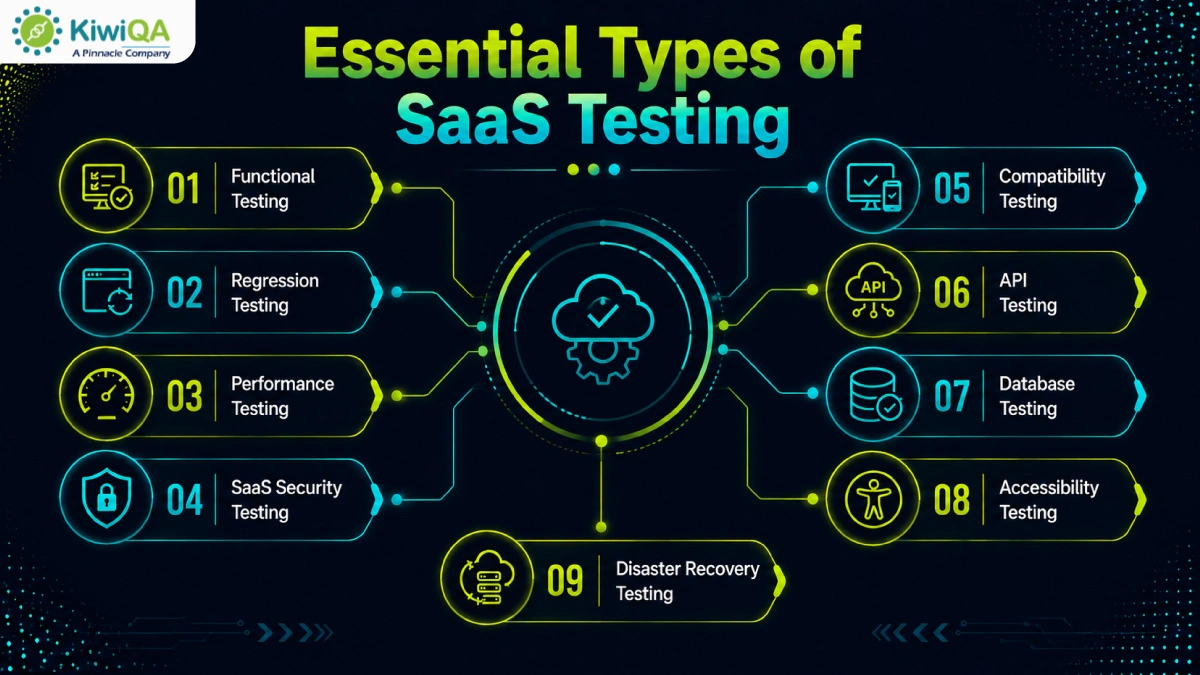
Performance testing evaluates a SaaS application’s responsiveness under various workloads. It assesses response times, throughput, resource usage, and general stability at high user traffic levels. In order to guarantee that the program can accommodate growing user numbers without experiencing performance issues, testing also confirms scalability. Early bottleneck identification contributes to a quicker and more responsive customer experience.
Vulnerabilities that may expose private company or client data are found through SaaS security testing. It verifies authorization, encryption, access controls, authentication, and protection against frequent online threats. Additionally, SaaS security testing guarantees adherence to industry standards. Frequent security evaluations lower risks, increase application resilience, and boost customer trust.
Testing for compatibility guarantees that the SaaS application works reliably on a variety of devices, OS, browsers, and screen sizes. Before deployment, testing finds compatibility issues, display inconsistencies, and browser-specific problems. In a variety of user environments, this procedure enhances accessibility, usability, and customer satisfaction.
API SaaS automated testing verifies the performance and functionality of application programming interfaces that link various systems. Additionally, API testing guarantees that integrations with third-party apps operate properly in various contexts. Early detection of API problems enhances system stability and avoids integration failures. It ensures accurate data exchange between linked services.
Database testing confirms that data is correctly processed, stored, and retrieved throughout the SaaS application. Database transactions, data consistency, integrity, and query performance are all validated. Additionally, testing verifies backup, restoration, and recovery protocols to safeguard vital business data. Reliable application operations are supported by efficient database testing, which lowers the risk of data loss.
Accessibility testing guarantees that users of various abilities can utilize the application efficiently. In comparison to established accessibility standards, it assesses keyboard navigation, screen-reader compatibility, color contrast, content structure, and interactive elements. When necessary, this SaaS testing process supports legal compliance while enhancing usability for a wider audience.
The organization’s capacity to restore SaaS services following unanticipated disruptions is validated through disaster recovery testing. It confirms business continuity plans, recovery time goals, restoration protocols, and backup integrity. Frequent testing guarantees that vital systems and client data can be promptly restored with minimal downtime. An effective disaster recovery plan lessens the impact of unexpected events on business and increases operational resilience.
Also Read : Top 15 SaaS Testing Tools for Faster and Scalable QA in 2026
For exploratory testing, usability evaluations, and the validation of recently created features, manual testing is the best option. It is especially helpful in complicated or dynamic workflows where human judgment is crucial. Usability problems, unexpected behaviors, and real-world user experience issues that automated scripts might find difficult to identify can be found through manual testing.
Regression testing, repeated test scenarios, cross-browser validation, API testing, performance testing, and CI/CD pipeline verification are the best uses for SaaS automated testing. Faster software releases and dependable validation following each code change are made possible by automation, which increases testing speed, consistency, and coverage while lowering manual labor.
Automation and manual testing are combined in an efficient model for SaaS testing strategy. Automate high-volume, repetitive, and stable test cases; for exploratory, usability, and customer-focused assessments, use manual testing. To maximize software quality, regularly assess automation coverage and match testing initiatives with business priorities.

As the demand for SaaS apps is growing and the necessity for robust & comprehensive QA is rising. From validating scalability & security to optimizing performance and user experience, SaaS QA is integral to managing the quality & app integrity. By adopting these necessary practices, businesses can safeguard their app. Collaborate with a SaaS testing company to keep your app ready for 2026 and beyond.

Join the like-minded community & get the latest updates and insights on software testing technological transformation around the globe. Don't miss out.


[…] Also Read : A Complete SaaS Testing Approach for Modern Businesses […]
[…] Also Read : A Complete SaaS Testing Approach for Modern Businesses […]