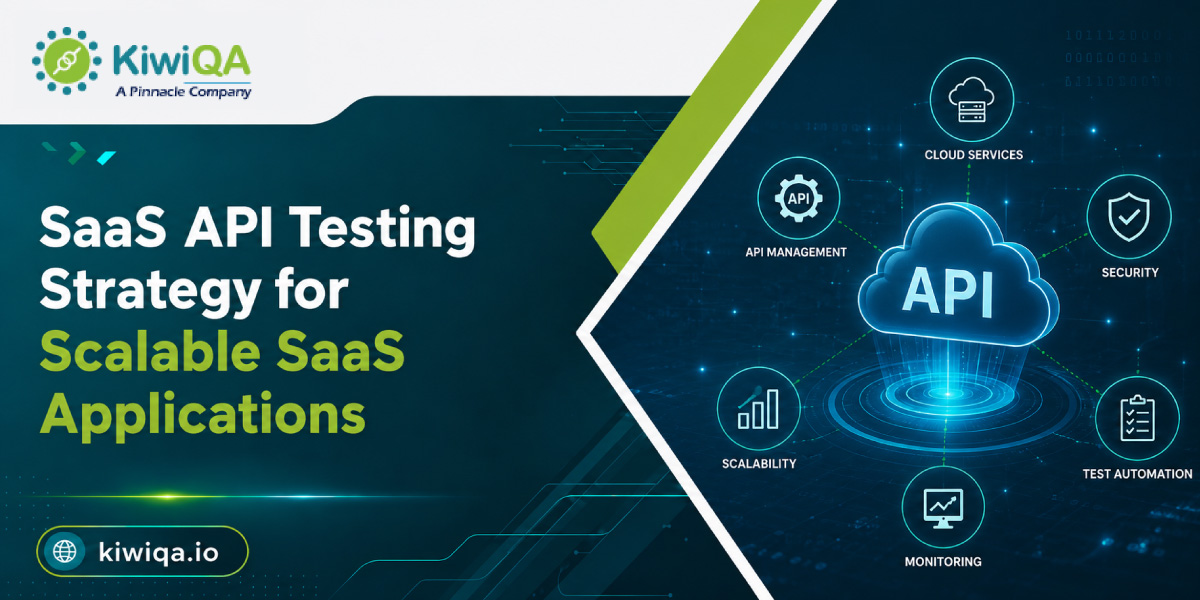
SaaS API Testing Strategy for Scalable SaaS Applications

Advanced SaaS apps rely on APIs to integrate the frontend interface with backend systems, microservices, 3rd-party platforms, and databases. APIs allow necessary functions like data exchange, authentication, payments, and integration across connected services. As SaaS platforms scale, API reliability becomes necessary because high user traffic and rising integration can expose performance, security, and integration errors. 30% more API demand is noticed, as per the report by Gartner.  82% of firms have relied on an API-first approach, based on research.

An organized SaaS API testing strategy allows firms to identify these risks early by verifying API performance, functionality, integration, security, and scalability through the development cycle. It also supports consistent app quality as new features, users, and services are introduced. Firms can use SaaS Testing Services to strengthen automated testing, improve API readability, validate crucial operations, and detect errors before production. A structured approach allows SaaS firms to manage stable app performance, safeguard sensitive data, reduce disruptions, and deliver a stable digital experience as the platform continues to grow. To learn about a well-organized API SaaS testing strategy, read the following sections.

What Is SaaS API Testing?

➥ How APIs Work in SaaS Applications

APIs allow communication and apps to exchange data and execute business functions. In SaaS environments, APIs also integrate 3rd-party platforms, support microservices communications, manage authentication, and allow secure data exchange. Testing these interactions supports requests, responses, integrations, and user management functions operating accurately across the app ecosystem.

➥ Why API Testing Is Important for SaaS Platforms

API testing allows SaaS firms to identify failures before they impact customers or production environments. SaaS testing company helps validate app stability by validating endpoint functionality, integrations, data exchanges, and performance. Frequent testing also supports identifying errors across connected services and reduces production errors. The structured practice ensures APIs remain stable, secure, responsive, and consistent as SaaS apps evolve.

What Is a SaaS API Testing Strategy?

API testing SaaS strategy describes what, when, and how APIs should be tested throughout the development lifecycle.  It establishes testing goals, environments, functional and integration testing, security and performance validation, automation, monitoring, and reporting processes. When integrated with SaaS application testing, the organized practice improves test coverage, identifies risks, and supports reliable SaaS deployment.

Why Scalable SaaS Applications Need a Strong API Testing Strategy

◈ Increasing Number of Users

APIs must manage growing traffic without experiencing performance problems as SaaS applications bring more users. Finding capacity limits, response-time issues, and possible delays is made easier by testing APIs under increasing workloads. As customer demand rises, regular scalability testing guarantees that crucial endpoints stay responsive and stable.

◈ Complex Third-Party Integrations

SaaS apps frequently rely on cloud services, CRM & payment gateways. These integrations are verified for reliable data exchange, authentication, error handling, and compatibility through API testing. This reduces the chance that crucial business processes or customer-facing features will be hampered by integration failures.

◈ Growing Microservices Architecture

SaaS automated testing is crucial for verifying service-to-service communication and dependencies as SaaS platforms grow their microservices architecture. Additionally, it helps in preventing failures that might have an impact on several business processes and application components.

◈ Frequent SaaS Product Updates

Regular SaaS releases may result in API modifications that impact current integrations and functionality. Validation of new releases, API version modifications, and updated workflows is supported by ongoing API testing. Automated regression testing ensures that current endpoints continue to function properly and allows quick product deployments.
Ready to Strengthen Your SaaS API Testing Strategy?

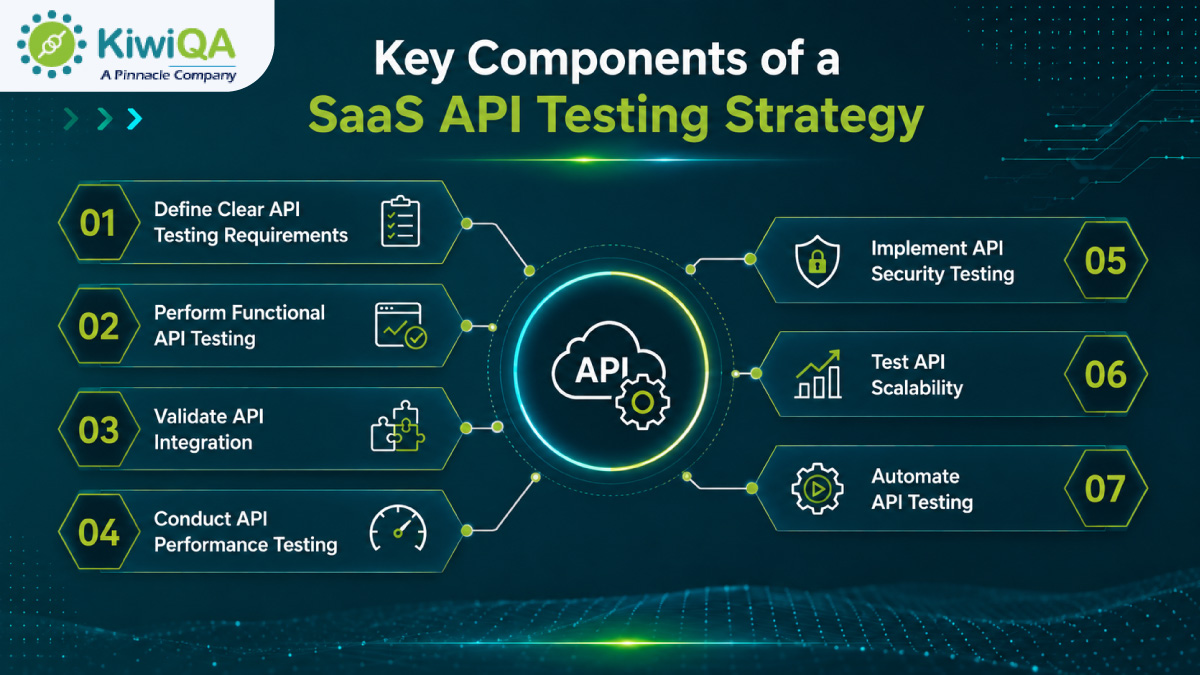
Key Components of a SaaS API Testing Strategy

1. Define Clear API Testing Requirements

Clearly defined testing requirements are the first step in a successful SaaS API testing strategy. Finding business-critical APIs that facilitate crucial application features and client workflows should be your first step. Describe each endpoint’s expected behavior, including response handling, error conditions, expected outputs, and acceptable inputs. 

To create uniform testing standards for development and quality assurance teams, document request and response formats. Based on business requirements, establish performance standards for response times. Early documentation of security requirements, including data protection, access controls, authorization, and authentication, is also important. For functional, performance, integration, security, and scalability testing, well-defined requirements offer a solid basis.

2. Perform Functional API Testing

Functional API testing confirms that APIs carry out their goals precisely and reliably. Test PUT or PATCH requests for updates, POST requests for resource creation, and GET requests to verify data retrieval. To guarantee that resources are appropriately deleted when necessary, DELETE requests should also be verified. 

Verify that APIs return the proper statuses for successful requests, client errors, and server failures by looking at HTTP response codes. Verify response data by comparing it to the expected formats, structures, and values. The proper content types, authentication details, and other necessary parameters should be checked in headers. Additionally, error messages should be examined to make sure they are consistent, accurate, and helpful.

Also Read : A Complete SaaS Testing Approach for Modern Businesses

3. Validate API Integration

Testing for API integration guarantees that APIs interact properly with linked systems and services throughout the SaaS environment. To ensure reliable data exchange and workflow execution, test interactions between internal services. Verify database connectivity to ensure data is updated, retrieved, and stored correctly. It is important to test third-party platform integrations for data consistency, error handling, and compatibility. 

Additional validation for transaction accuracy, failures, and secure processing is essential for payment system integrations. To ensure trustworthy identity verification and access control, authentication providers should be put to the test. In order to guarantee that APIs maintain consistent communication across distributed environments, cloud applications should also be included. Failures that could impact entire business workflows can be found with the help of integration testing.

4. Conduct API Performance Testing

API performance testing evaluates the performance of SaaS APIs under various traffic scenarios. Load testing helps teams assess whether response times are still acceptable by measuring API behavior under expected user and transaction volumes. In order to find breaking points and recovery behavior, stress testing pushes APIs beyond their typical capabilities. 

While endurance testing assesses performance over extended workloads, spike testing assesses how APIs react to unexpected spikes in traffic. Response-time testing helps in locating slow endpoints that could compromise user experience. Throughput testing determines how many requests an API can accept for a certain time period.  Teams can find performance issues before they affect customers by using these tests.

5. Implement API Security Testing

SaaS apps, client data, and interconnected systems are secured from common threats by API security testing. Verify that only valid users and applications are able to access protected endpoints by testing authentication methods. Testing for authorization guarantees that users can only access resources and functions that are authorized. 

Verify input validation, encryption methods, and API tokens to avoid malicious requests and illegal access. To reduce abuse and excessive traffic, rate limiting should be tested. Additionally, teams should examine APIs for sensitive data exposure in error messages, logs, or responses. To find vulnerabilities and improve overall application security, SaaS security testing should be incorporated throughout the API testing lifecycle.

6. Test API Scalability

The ability of SaaS APIs to manage growing traffic without experiencing significant performance degradation is ascertained through API scalability testing. Increase API traffic gradually to see how the system responds to an increase in users and requests. To find restrictions on processing power, connections, or shared resources, test concurrent requests. 

To find out when performance starts to slow down, measure response times at various traffic levels. It is also necessary to identify infrastructure barriers in servers, databases, networks, and supporting services. Verify auto-scaling behavior to make sure that cloud resources grow in response to demand. As customer usage grows, scalability testing helps SaaS companies maintain consistent API performance.
Key Components of a SaaS API Testing Strategy

7. Automate API Testing

Throughout the SaaS development lifecycle, API test automation increases testing coverage, speed, and consistency. Automate routine functional and validation tests so that QA teams can carry them out effectively without the need for human intervention. To find errors early in the development and deployment process, incorporate API tests into CI/CD pipelines. 

When new features, integrations, or code modifications are added, automated regression testing can confirm that the functionality of the API remains the same. To rapidly find unexpected issues, tests should also be conducted following significant code modifications. Automation lowers the possibility of human error and allows for regular testing across development environments. Faster releases are ultimately possible while preserving API quality and reliability thanks to a well-designed automation framework.

SaaS API Testing Strategy Across the Development Lifecycle

🢣 During Development

To find problems before they progress to later testing stages, API SaaS application testing should start during development. Testing individual endpoints, functions, and validation logic separately is known as unit-level API testing. Schema validation verifies that the specified structure, data types, and necessary fields are followed by API requests and responses. 

Early detection of functional defects, inaccurate answers, validation errors, and implementation problems is made possible by developer testing. Defects can be fixed later in the development lifecycle with less expense and effort if testing is performed at this stage. Additionally, it provides developers with instant feedback when API behavior differs from technical specifications. Reliable integrations and later testing activities are strengthened by early testing.

🢣 During Integration

Integration testing confirms that APIs function properly when associated with other platforms, services, and data sources. Service integration testing verifies that requests and responses flow properly between connected services and examines communication between internal application components. Third-party API validation ensures that external integrations correctly manage timeouts, failures, data formats, authentication, and response codes. 

Data flow testing confirms that data is accurately transferred between databases, applications, external systems, and APIs. Compatibility problems that might not show up during isolated endpoint testing are found with the help of these tests. Additionally, testing integrations prior to production lowers the possibility of inconsistent data, broken workflows, and failures across dependent SaaS services.

🢣 Before Production Release

APIs should go through extensive testing to make sure they are prepared for practical use before a SaaS application is released. Regression testing confirms that the functionality of the API has not been impacted by recent changes. Response times, throughput, and behavior under typical and peak workloads are all evaluated through performance testing. 

Authentication, authorization, data security, input validation, and other possible weaknesses are all examined during security testing. Complete business workflows across multiple linked services and endpoints are validated through end-to-end API testing. There is more assurance regarding the reliability and stability of the application when these testing tasks are combined. To reduce production risks, any major errors found during this phase should be fixed and retested prior to deployment.

🢣 After Production Deployment

After deployment, API testing should continue to ensure consistency and identify problems that might arise in real-world scenarios. Continuous visibility into endpoint availability, status, traffic patterns, and failures is made possible by API monitoring. Response-time tracking helps in identifying poor performance that may have an impact on linked apps or user experience. 

Error monitoring identifies recurrent endpoint issues, server problems, unexpected responses, and unsuccessful requests. Teams can identify unusual behavior and react swiftly to incidents with the help of ongoing monitoring. SaaS companies can maintain stable APIs and resolve production issues before they have a major impact on customers by combining monitoring with continuous validation.

Important Types of API Testing for SaaS Applications

❏ Functional API Testing

To make sure APIs function properly, functional API testing confirms endpoint behavior, request handling, response validation, business logic, and error handling.

❏ Integration API Testing

In order to verify secure data exchange, integration API testing verifies communication between databases, third-party platforms, internal services, and APIs.

❏ Regression Testing

Regression testing verifies that after code updates, bug fixes, new features, or integration modifications, the functionality of the current API remains stable.

❏ Performance Testing

Under various workload scenarios and usage levels, performance testing assesses API response times, throughput, resource consumption, and stability.

❏ Load Testing

To find performance limitations under peak traffic, load testing measures how an API behaves under expected traffic volumes and concurrent requests.

❏ Security Testing

Vulnerabilities related to authentication, authorization, encryption, input validation, rate limiting, and sensitive data exposure are found through SaaS security testing.

❏ Reliability Testing

API availability, stability, error recovery, fault tolerance, and consistent performance over long operating times are all evaluated by reliability testing.

❏ Compatibility Testing

Testing for compatibility ensures that APIs function consistently across various platforms, technologies, and versions of connected applications.

❏ Contract Testing

Contract testing confirms that agreed-upon schemas, formats, fields, and service integration requirements are met by API requests and responses.

❏ End-to-End Testing

To guarantee smooth application functionality, end-to-end SaaS automated testing verifies entire business processes across numerous APIs, services, databases, and integrations.

How to Build a Scalable SaaS API Testing Framework

☛ Identify Critical API Workflows

APIs that allow for crucial SaaS processes, such as user registration, login, payments, subscription management, data processing, and third-party integrations, should be given top priority. Issues that could have a direct impact on customer experience, revenue, security, and business operations can be found by testing these crucial workflows first.

☛ Create Reusable Test Cases

To increase testing consistency and reduce duplication, create reusable test cases. Establish shared validation rules, response checks, common authentication techniques, and standard request templates. Expanding test coverage, maintaining automation scripts, and modifying the framework as APIs and SaaS functionality change are all made easier by reusable components.

☛ Separate Test Data and Test Logic

For easier maintenance and scaling of the framework, keep test data and testing logic apart. Use reusable datasets and set up environment-specific variables for production and development. This method allows the same tests to run in different environments, streamlines updates, and lowers errors.

☛ Integrate API Testing with CI/CD

Continuous validation during development and deployment can be achieved by incorporating automated API tests into CI/CD pipelines. Code changes, pull requests, staging deployments, and production releases are all possible times for tests to run. As applications change, this helps teams identify API flaws early, avoid unstable releases, and maintain consistent quality.

SaaS API Testing Metrics Businesses Should Track

Organizations must monitor key SaaS API testing metrics to measure reliability, performance, and quality. API response time & latency describe how quickly endpoints respond, whereas API availability calculates accessibility and uptime. Error rate and failed request percentage allow you to identify recurring failures and unstable endpoints. 

Request throughput and concurrent user capacity showcase how effectively APIs manage traffic and rising demands. Test coverage measures functionality, whereas error detection rate shows the effectiveness of testing. Mean time to detect API failures allows the team to monitor production errors quickly and respond before they impact users.

Also Read : Best 11 SaaS Testing Companies in India (Edition 2026)

How SaaS API Testing Supports Application Scalability

▪ Support growing user bases- SaaS API testing validates that APIs can manage increasing users, transactions, and requests without performance errors.

▪ Maintain API response times– Testing identifies slow endpoints and performance errors before they affect users.

▪ Prevent service disruptions– It identifies capacity errors, failures, and unstable integrations before production release.

▪ Improve system reliability- Test API stability, error handling, and recovery under various conditions.

▪ Handle peak traffic– It evaluates API performance during peak traffic and high-demand periods.

▪ Support microservices expansion– QA ensures the API communicates reliably as businesses add integrations and app components.

▪ Reduce production defects– Automated testing catches integration, functional, security, and performance errors earlier.

▪ Improve customer experience– Reliable & responsive APIs allow delivering smooth application performance and consistency in user interactions.

Ready to Build a Scalable SaaS Testing Strategy?

Build a Reliable SaaS API Testing Strategy for Long-Term Scalability

Reliable API testing services for SaaS applications allow firms to prepare their apps for sustained growth and changing user demands. Identify security, performance, and integration errors before release to reduce production errors and service disruptions. It is good to develop a scalable testing process that aligns with rising SaaS architecture, improving users, integrations, and feature releases. Automated & continuous API testing allows reliability by validating crucial operations throughout development. 

Collaboration with a professional SaaS testing company can offer specialized expertise, performance validation, security assessment, and continuous quality assurance. With the following organized approaches, firms can strengthen API stability, support scalability, and deliver consistent app experiences as SaaS platforms expand.
Top Functional Testing Tools to Consider in 2026

Functional testing is an important step of the SDLC, necessary to validate the app’s performance. It checks whether the app performs as per the defined goals and delivers expected outcomes. As applications become complicated, organizations are widely depending on functional testing services to identify errors, improve reliability, and manage a consistent user experience. 

The global software testing market is expected to grow to $93.2 billion by 2033, at a CAGR of 8.5% from 2026 to 2033. In 2026, AI-driven testing, automation, and frequent testing are changing traditional QA by allowing quick test execution, broad coverage, and early error detection. Advanced testing tools also integrate with CI/CD pipelines, supporting frequent & reliable software releases.

Here, you will explore the top functional testing tools used by functional testing companies, including their key features, benefits, and best use cases.

What Is Functional Testing?

➥ Definition of Functional Testing

A software testing method called functional testing verifies that an application’s features operate in accordance with specified functional requirements. To make sure the software carries out its intended tasks accurately and consistently under anticipated circumstances, it validates inputs, outputs, user interactions, and business workflows.

➥ Why Functional Testing Is Important

Partnering with functional testing companies improves software quality, reliability, and stability prior to release by assisting in the early detection of flaws. It guarantees that applications fulfill user expectations and improve the user experience by validating crucial features and workflows. Additionally, early defect detection lowers rework, production risks, and the total cost of testing and maintenance.

Why Do You Need Functional Testing Tools?

Functional testing tools increase test coverage across application features and workflows, automate repetitive testing tasks, and improve test accuracy. They cut down on the time and effort required for manual testing by assisting teams in finding bugs early in the development cycle. The functional testing solutions support faster, more reliable software releases while preserving consistent quality across various environments by simplifying regression testing and offering quicker feedback.

Ready to Strengthen Your Functional Testing Strategy?

Key Features to Look for in a Functional Testing Tool

◈ Test automation capabilities

Select tools for functional software testing services that effectively automate repetitive tasks. Robust automation capabilities speed up execution, decrease manual labor, increase consistency, and enable teams to reuse test cases across several releases.

◈ Web, mobile, and API testing support

When looking for functional testing tools, pick one that must be flexible to support various environments. Teams can now validate various application components without having to maintain multiple testing tools.

◈ Cross-browser and cross-platform compatibility

Teams can ensure consistent performance and user experiences by verifying application functionality across various browsers, operating systems, devices, and environments thanks to cross-browser and cross-platform support.

◈ AI-powered testing features

Test case generation, defect detection, automation script maintenance, and test result analysis are all made possible by AI-powered functional testing solutions. These features can increase testing effectiveness and lessen maintenance work.

◈ CI/CD integration

Automated tests can run whenever code changes are deployed or committed thanks to CI/CD integration. Throughout the software development lifecycle, this allows for continuous testing, early defect detection, and quick feedback.

◈ Parallel test execution

Multiple test cases can run concurrently across various environments, browsers, or devices thanks to parallel execution. This helps teams get quicker feedback during regression and release testing and cuts down on overall testing time.

◈ Test reporting and analytics

Detailed reporting and analytics provide visibility into test execution, failures, defects, and quality trends. QA teams can track testing progress, find problems fast, and make well-informed release decisions with the help of clear reports.

◈ Ease of use and learning curve

A functional testing tool should provide accessible workflows, clear documentation, and an easy-to-use interface. A lower learning curve speeds up the adoption of automation by QA teams and lowers the need for training, especially for less experienced testers.

◈ Scalability and pricing

Examine the tool’s scalability as applications, users, test cases, and testing environments increase. Before choosing, consider the long-term value, maintenance costs, available features, and licensing costs.

Also Read : Functional Testing Company in the USA

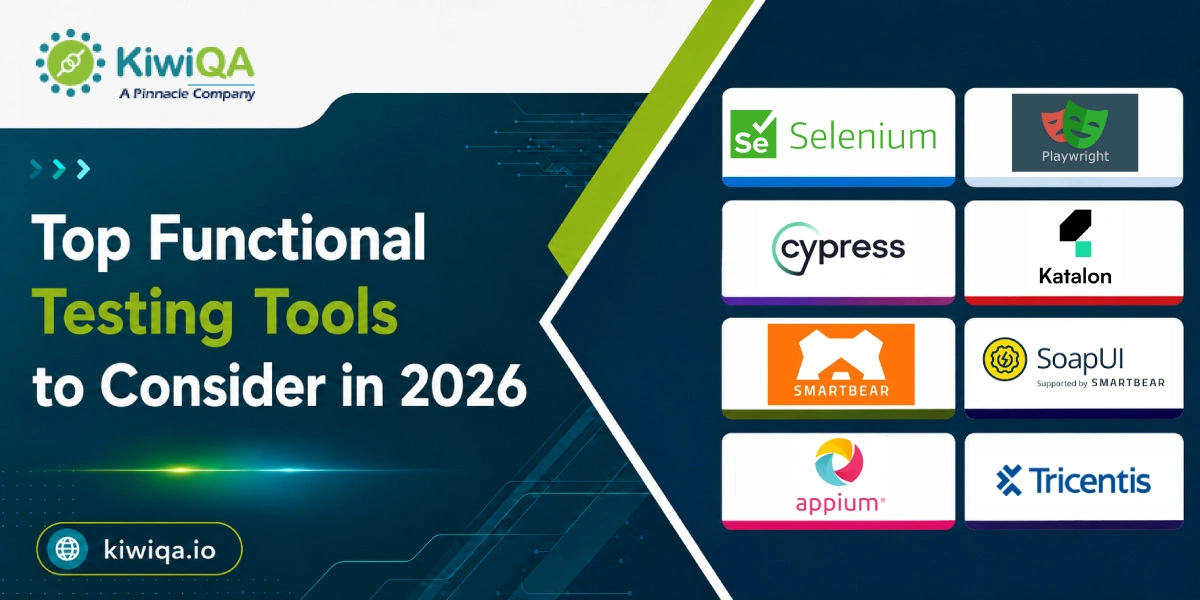
Top Functional Testing Tools to Consider in 2026

1. Selenium

1. Selenium

For functional and end-to-end testing of web applications, Selenium is an automation framework available for all users. Support for several programming languages, parallel test execution, integration with CI/CD tools and testing frameworks, and compatibility with popular browsers like Chrome, Firefox, Edge, and Safari are some of its key characteristics. Flexibility, broad browser compatibility, a large community, and no licensing fees are some of its main advantages. 

Talking about limitations, it lacks built-in features for reporting and managing tests and requires programming expertise. To create a comprehensive testing ecosystem, teams frequently require extra tools. Organizations that require flexible browser automation for functional, regression, cross-browser, and end-to-end testing across various environments are best suited for Selenium.

2. Playwright

Playwright

Playwright is a free automation framework created for functional testing of advanced web apps. Support for Chromium, Firefox, and WebKit, automatic waiting, parallel test execution, network interception, screenshots, tracing, and multiple browser accessibility are some of its major features. Its advantages include robust cross-browser QA, quick execution, reliable handling of dynamic web pages, and debugging features. 

To create and manage advanced automation suites, teams might need programming knowledge. For modern web applications that need reliable, functional, regression, and end-to-end testing, Playwright is especially appropriate. Applications with dynamic interfaces, intricate workflows, numerous browsers, and continuous integration environments benefit greatly from it.

3. Cypress

Cypress

Cypress is a JavaScript-based AI functional testing tool for testing web applications that focuses on functional, end-to-end testing. Automatic waiting, real-time test execution, network request control, screenshots, videos, and thorough error reporting are some of its main features. Development and QA teams can use Cypress because of its developer-friendly interface, rapid setup, quick feedback, and simple debugging. 

It is mainly focused on web applications rather than native mobile testing, and it has limitations for some browser automation scenarios. Additional tools or configuration may be necessary for some advanced testing requirements. Teams testing modern web applications, especially JavaScript-based projects, where quick feedback, reliable functional testing, and simple debugging are crucial, are best suited for Cypress.

4. Katalon

Katalon

Web, API, mobile, and desktop application testing are all supported by Katalon, an integrated testing platform. Low-code and script-based automation, record-and-playback capabilities, reusable test components, API testing, test reporting, and CI/CD integration are some of its major features. Its ability to create automated tests for both technical and non-technical testers, as well as its advanced capabilities for skilled QA professionals, is one of its key advantages.

However, teams with highly specific automation needs might favor more adaptable code-based frameworks, and some advanced features require paid plans. Organizations seeking a centralized testing platform that can facilitate functional and regression testing across various application types are best suited for Katalon. Teams handling desktop, mobile, web, and API testing in a single environment may find it especially helpful.

5. SMARTBEAR TestComplete

SMARTBEAR TestComplete

A commercial automated testing platform called SmartBear TestComplete is designed for functional testing of desktop, mobile, and web applications. Keyword-driven and script-based testing, record-and-replay capabilities, object recognition, data-driven testing, parallel execution, and CI/CD integration are some of its major features. The platform supports testers with a range of technical proficiency while assisting teams in developing reusable automation. 

Licensing fees and the requirement for correct configuration and upkeep as automation suites expand are among its drawbacks. For efficient test management, larger test environments might also need more preparation. QA teams and businesses looking for a commercial automation solution for functional and regression testing are best suited for TestComplete. When businesses need to automate testing across various application types while maintaining reusable and scalable test assets, it can be especially helpful.

6. SoapUI

SoapUI

The main purpose of SoapUI is to test web services and APIs functionally. Assertions, data-driven testing, service mocking, API automation, test reporting, and request and response validation are some of its main features. It assists testers in confirming whether APIs operate appropriately and whether various services exchange data as anticipated. 

Its advantages include a user-friendly interface, robust API testing capabilities, and support for testing services separately from the application interface. However, complete user-interface automation is not the primary focus of SoapUI; the commercial ReadyAPI platform offers some advanced features. It is best for API functional testing, integration testing, regression testing, service validation, and confirming backend functionality.

7. Appium

Appium

Appium is an open-source automation framework used for testing various web apps. Cross-platform mobile automation, support for various programming languages, integration with testing frameworks, and compatibility with actual devices are some of its key features. Open-source availability, support for a wide range of mobile platforms, and the capacity to automate various mobile application types using a standard methodology are among its main advantages.

However, maintaining tests across various OS versions and configuring device environments can call for technical expertise and constant work. When businesses require automated coverage for both iOS and Android, Appium is the ideal choice for functional and regression testing of mobile applications. Teams that require repeatable mobile test execution across various devices and OS versions will find it especially helpful.

8. Tricentis Tosca

Tricentis Tosca

Tricentis Tosca is an enterprise testing platform that automates software testing using a low-code, model-based methodology. Model-based test automation, risk-based testing, reusable test components, API testing, service virtualization, and integration with CI/CD environments are some of its key characteristics. Reduced reliance on traditional scripting, support for various technologies, reusable automation assets, and features intended for extensive enterprise testing programs are some of its advantages. 

However, teams that are not familiar with Tosca’s model-based approach may need to undergo training, and it may involve high licensing costs. Large companies that require scalable functional and regression testing across complex enterprise applications are best suited for it. Organizations handling complex testing requirements across numerous technologies, business processes, applications, and continuous delivery environments may find Tosca especially helpful.

Benefits of Using Functional Testing Tools in 2026

🢣 Faster Test Execution

Teams can run tests much more quickly than they could with manual testing thanks to functional testing tools, which automate repetitive test cases. When necessary, automated scripts can repeat tests and run several scenarios at once. This shortens the time required for regression testing, speeds up development cycles, and helps QA teams find flaws earlier.

🢣 Improved Test Coverage

Teams can test more application features, workflows, inputs, and user scenarios in less time with the help of functional testing tools. Critical functions can be consistently validated across various environments and configurations using automated test suites. Increased test coverage lowers the possibility of missed flaws and helps companies in producing applications that function reliably in a variety of scenarios.

🢣 Better Software Quality

Automated functional testing guarantees that application features continue to function as intended following code changes and helps in the early detection of defects. Testing accuracy is increased, and human error is decreased with consistent test execution. Testing tools assist development teams in maintaining software quality, reliability, stability, and an improved user experience by continuously validating crucial business functions.

🢣 Reduced Testing Costs

By automating time-consuming and repetitive tasks, functional testing tools can lower long-term testing expenses. Teams can reuse automated tests across several releases with little manual labor once they are created. Early defect detection also helps organizations use QA resources more effectively by lowering the cost of fixing problems later.

🢣 Continuous Testing and CI/CD Support

Continuous testing is made possible throughout the software development lifecycle by the integration of modern functional testing tools with CI/CD pipelines. Every time developers commit code or make changes, automated tests can run, giving quick feedback on possible flaws. Through frequent cycles of development and deployment, this integration enables teams to release software more quickly without sacrificing quality.

🢣 Enhanced Reporting and Visibility

Functional testing tools make testing results easier to comprehend by offering comprehensive reports, test results, logs, screenshots, and execution metrics. Test failures, ongoing issues, and quality trends can be promptly identified by QA teams and stakeholders. Faster troubleshooting, better decision-making, and more efficient communication between the development, testing, and business teams are all improved by increased visibility.

🢣 Scalability

Organizations can increase their testing efforts as applications, users, and test scenarios increase thanks to functional testing tools. Numerous test cases can be handled by automated suites, which can run them in various configurations or environments. Testing tools are useful for both expanding applications and large enterprise systems with complicated testing requirements because of their scalability.

How to Choose the Right Functional Testing Tool

❏ Based on Project Requirements

Your application type, technology stack, testing scope, and overall complexity should all be taken into consideration when selecting a functional testing tool. Think about whether you require desktop, mobile, web, or API testing capabilities. Finding tools that complement your application architecture and testing goals can also be improved by working with a skilled functional testing service provider.

❏ Based on Team Expertise

When choosing the best functional testing tools, take your team’s technical proficiency into account. While QA-focused platforms can make test creation and management easier, developer-focused frameworks might be more appropriate for teams with programming experience. Teams with little coding experience can benefit from low-code and no-code tools. It allows testers to automate functional tests without a deep understanding of programming.

❏ Based on Budget and Scalability

Based on your project size, budget, and future testing requirements, compare open-source and commercial tools. While commercial platforms might provide advanced functions and support, open-source options can lower the initial costs for smaller projects. The top functional testing tools that can grow with expanding test suites, users, and environments are needed for enterprise applications.

❏ Based on Integration Requirements

Select a tool that works well with your current ecosystem for testing and development. Verify compatibility with DevOps tools, cloud environments, test management systems, and CI/CD pipelines. Effective integration can help teams maintain consistent functional testing throughout the SDLC by automating test execution, improving reporting, and offering quicker feedback during development.

Also Read : Top Functional Testing Services That Boost Confidence in Every Release

Functional Testing Trends to Watch in 2026

◈ AI-powered test generation

By examining application requirements, user flows, and existing code, AI-powered test generation is assisting QA teams in producing test cases more quickly. These tools can reduce repetitive manual labor during functional testing by identifying critical scenarios, creating test scripts, and increasing coverage.

◈ Self-healing test automation

When application elements or interfaces change, self-healing automation uses AI to automatically change test scripts. This lessens maintenance effort and test failures caused by small UI changes. Self-healing features can increase automation stability and dependability as applications change quickly.

◈ Low-code and no-code testing

QA specialists can create automated tests with little programming thanks to low-code and no-code testing platforms. Automation is made more accessible through visual interfaces, reusable parts, and drag-and-drop workflows. These tools can lessen an organization’s reliance on highly specialized programming skills.

◈ Continuous testing in CI/CD

Continuous testing, which enables automated functional tests to run throughout development and deployment, is quickly becoming a crucial component of CI/CD workflows. By incorporating testing into pipelines, development teams can maintain software quality while producing frequent releases, receive quicker feedback, and find flaws earlier.

◈ Cloud-based testing platforms

Scalable testing environments are accessible through cloud-based testing platforms without requiring substantial physical infrastructure. Applications can be tested on demand across devices, OS, browsers, and configurations by teams. This adaptability facilitates efficient testing of modern applications, quicker test execution, and distributed teams.

◈ Increased use of parallel testing

With parallel testing, several automated test cases can run concurrently in various environments. This helps teams get faster feedback and drastically cuts down on the total amount of time spent testing. Parallel execution becomes more crucial for effective regression and functional testing as release cycles get shorter.

◈ Unified web, API, and mobile testing

Web, API, and mobile testing capabilities are being added to unified environments by testing platforms. With fewer tools, teams can manage workflows, automation, and test results. Unified testing can enhance teamwork, make test administration easier, and offer more comprehensive coverage across interconnected application components.

◈ AI-assisted test maintenance and defect analysis

By identifying test components, monitoring trends in failures, and examining defect data, AI-assisted testing can assist teams in maintaining automation suites. These features can help functional testing service providers concentrate their efforts on flaws that have a bigger business impact, prioritize critical issues, and shorten troubleshooting times.

Ready to Discuss Your Functional Testing Requirements?

Ready to Upgrade Your Functional Testing Approach?

Functional testing remains essential for delivering reliable, high-quality software. Tools we have mentioned before offer various benefits for diverse testing requirements. The ideal choice depends on the tech stack, project scope, team expertise, and budget. The functional testing company offers valuable guidance. Before adoption, determine the shortlisted tools’ use case, benefits, limitations, and features.

SAP Testing Process: A Complete Step-by-Step Guide for 2026

SAP systems support complex business operations across industries. As organizations adopt SAP S/4HANA, cloud platforms, and connected apps, testing becomes crucial for managing reliable business processes and data flows. Inadequate testing can lead to integration failures, incorrect data, performance errors, and costly production errors. The recent survey by Gartner shows 75% of ERP strategies aren’t strongly aligned with overall business strategy, leading to confusion.

A structured SAP Testing Process led by an experienced SAP testing company helps firms identify risks during implementation, migration, and upgrades before they impact production. Learn in this blog where we explain the testing types, key stages, metrics, automation trends, and effective SAP testing services.

What Is SAP Testing?

The process of verifying that SAP applications, configurations, custom developments, integrations, and business workflows function as intended is known as SAP testing. SAP testing places a strong emphasis on integrating enterprise processes and data flows, in contrast to traditional software testing. SAP testing companies assist organizations in confirming that SAP supports precise, dependable, and continuous business operations by verifying entire business scenarios across modules and external systems.

➥ Why Is SAP Testing Important?

SAP testing solutions assist companies in maintaining data accuracy, reducing production defects, validating integrations, safeguarding business-critical processes, and improving system reliability. By identifying functional, data, performance, and integration issues prior to go-live, it also lowers the risks associated with SAP implementations, upgrades, and migrations. Businesses are more confident that SAP processes will function properly and support continuous daily operations when they undergo thorough testing.

Ready to Build a Reliable SAP Testing Strategy?

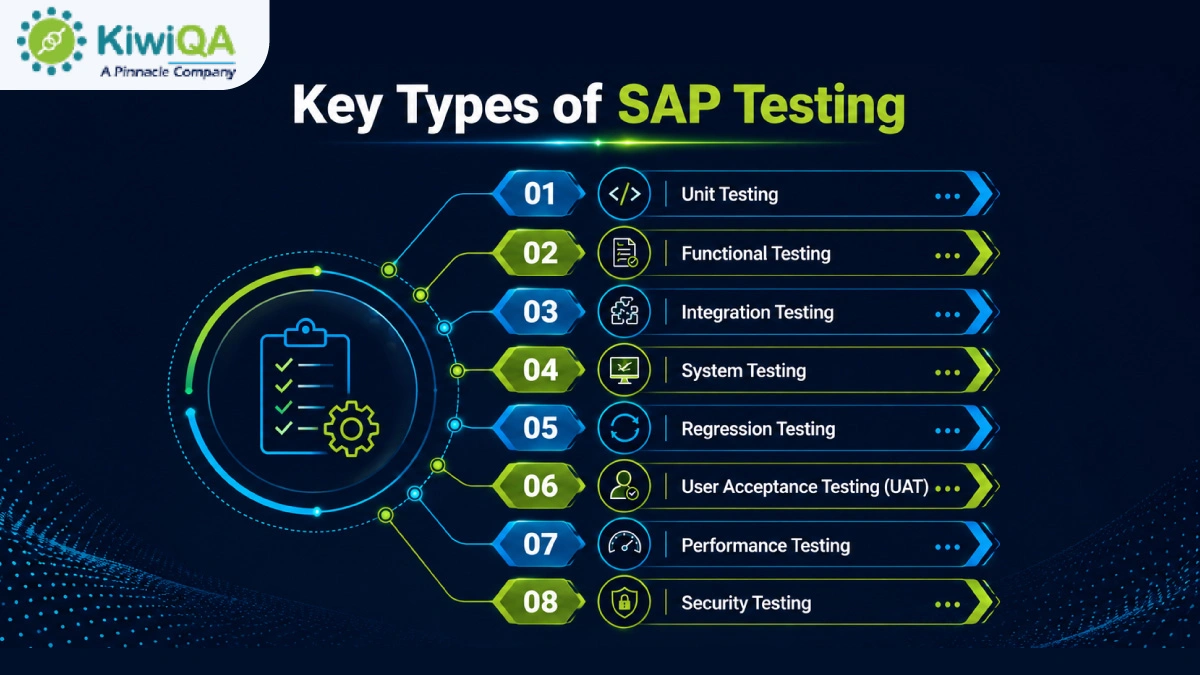
Key Types of SAP Testing

🢣 Unit Testing

Before they are integrated with other components, individual SAP configurations, developments, custom code, reports, interfaces, or objects are the focus of unit testing. Developers or testers confirm that every component operates according to its technical specifications and produces the desired outcomes. Finding flaws early on reduces the amount of work needed during subsequent testing stages. It helps to stop minor coding or configuration problems from impacting more significant business processes.

🢣 Functional Testing

Functional SAP testing services assess whether SAP modules and functions operate according to specified business requirements. Based on anticipated business rules and results, testers verify procedures. This testing verifies that configured SAP functionality supports intended operations and appropriately manages various business conditions. It assists in identifying gaps between the documented functional requirements and the implemented solution.

🢣 Integration Testing

Integration testing of SAP solutions confirms that information is correctly exchanged between SAP modules and related applications. In addition to external systems, APIs, middleware, and third-party applications, testers verify data flows between departments like sales, finance, procurement, and inventory. The goal is to verify that dependent processes function as intended and that transactions flow across system boundaries with accuracy. This helps in identifying problems with interfaces, mapping, synchronization, and data transfer.

🢣 System Testing

Instead of testing individual components separately, system testing assesses the SAP environment as a whole. In compliance with specified requirements, testers verify integrated functionality, configurations, interfaces, workflows, and system behavior. To determine whether various components function properly under realistic circumstances, end-to-end business scenarios are performed.

🢣 Regression Testing

Regression testing verifies that SAP’s current functionality is still functional following upgrades, patches, configuration updates, and custom code changes. To find unexpected effects on established business processes, testers rerun suitable scenarios. Particular attention should be given to critical workflows and frequently used transactions. Particularly in large SAP environments with frequent releases and interconnected processes, automating repetitive regression scenarios can increase execution speed and consistency.

🢣 User Acceptance Testing (UAT)

From the viewpoint of its intended users, user acceptance testing establishes whether SAP satisfies realistic business requirements. Business teams test whether the system supports anticipated results by running realistic scenarios similar to their everyday operations. Users record process problems, functional gaps, and other issues so they can be fixed.

🢣 Performance Testing

Performance SAP automation testing company assesses how SAP reacts to various workload scenarios and whether the system maintains stability as transaction volumes rise. Response times, throughput, resource usage, and system behavior under typical, peak, and stressful circumstances are all measured by testers. High-volume procedures and crucial transactions should be given priority. Teams can increase reliability for production users by using performance testing to find errors prior to deployment.

🢣 Security Testing

Security testing evaluates how well SAP protects business data and limits system access based on roles and authorizations. While searching for possible security flaws, testers confirm user permissions, access controls, and authentication procedures. Testing should also take into account whether users have access to features or data that are outside of their control. Prior to production deployment, comprehensive SAP testing solutions assist organizations in identifying access risks and improving SAP security.

Key Types of SAP Testing

SAP Testing Process: Step-by-Step Guide

Step 1 – Understand Business Requirements

The first step is to go through the business and functional requirements that specify how the SAP solution must function. Determine which SAP business processes are essential, such as workflows that have a direct impact on revenue, customers, finance, the supply chain, or employees. 

To comprehend possible testing impacts, examine integrations and dependencies with other SAP modules and external applications. Clearly define the acceptance criteria and anticipated business results. This foundation ensures that test activities stay in line with organizational goals, helps testing teams concentrate on business-critical functionality, and minimizes coverage gaps.

Step 2 – Define the SAP Testing Scope

Before creating complex test activities, clearly define the testing scope. Determine which SAP modules, applications, and business functions need to be validated in accordance with project goals and risk levels. Identify the essential workflows that must function properly in all integrated processes. 

Incorporate middleware, interfaces, APIs, and external systems that communicate with SAP. To avoid misunderstandings during execution, the team should clearly document both in-scope and out-of-scope areas. Teams can prioritize high-risk functionality, allocate resources efficiently, and maintain consistency throughout the SAP project with the support of a clearly defined scope.

Step 3 – Develop an SAP Test Strategy

An SAP testing process outlines how the testing procedure will be carried out and managed during the project. Determine testing goals first, taking into account project requirements, system complexity, and business risks. Select the best QA types that are functional, integration, performance, and security. 

Environments, automation opportunities, roles, entry and exit requirements, and defect-management protocols should all be specified in the strategy. Teams can prioritize high-risk procedures, make effective use of resources, and maintain uniform testing coverage across SAP modules and integrations with the support of a clear strategy.

Also Read : Top 10 SAP Testing Company in US Delivering End-to-End SAP Quality Assurance

Step 4 – Create the SAP Test Plan

The SAP business process automation testing strategy is converted into a workable schedule of responsibilities and tasks by the SAP test plan. It should outline what will be tested, when testing will take place, who will carry out each task, and what environments or tools will be required.

Dependencies between SAP modules, integrations, test data, and business users should all be taken into consideration in the plan. Incorporate risk-management and reporting protocols so that interested parties can keep an eye on developments and address any delays or serious flaws. A thorough test plan offers a methodical way to organize testing from planning to final validation.

Step 5 – Prepare the SAP Testing Environment

The configuration and integrations that the system will use in production should be closely mirrored in the SAP testing environment. Before execution starts, testers set up the necessary SAP modules, interfaces, databases, middleware, and related apps. To make sure data can transfer between SAP and external systems properly, system connectivity needs to be verified.

Incorrect permissions can prevent valid test execution or reveal security flaws, so user roles and authorizations must also be verified. Early environment preparation helps in differentiating issues resulting from configuration, connectivity, access, or infrastructure from actual application flaws.

Step 6 – Prepare SAP Test Data

The business conditions that users will face in production should be accurately reflected in SAP test data. For procedures like order management, procurement, finance, and inventory, testers create master data, transactional records, and scenario-specific datasets. To confirm how SAP manages expected and exception conditions, both valid and invalid data should be included. Regression testing can be made quicker and more reliable by using an SAP automation testing company to automate the creation of test data for repetitive scenarios.

Step 7 – Design SAP Test Cases and Scenarios

SAP test cases should convert business requirements into verifiable, executable conditions. Create end-to-end scenarios that represent entire business processes after beginning with individual functions. Every test case should specify the requirements, test data, execution procedures, and anticipated outcomes. Additionally, traceability, which enables teams to assess whether crucial business functionality has been sufficiently tested, is provided by connecting test cases to requirements.

Step 8 – Execute SAP Tests

Testers run authorized scenarios against the configured SAP environment during test execution, comparing actual system behavior with expected outcomes. According to the project’s reporting guidelines, each test should be marked as passed, failed, blocked, or something else. Testers should record relevant documentation, such as screenshots, transaction details, logs, or error messages, whenever a failure happens. The planned scope and timeline should be used to monitor testing progress. Failures are simpler to recreate, look into, and share with developers, SAP consultants, and business stakeholders thanks to this methodical approach.

Step 9 – Identify and Manage Defects

Defects in SAP should be recorded so that technical teams can comprehend and reproduce the issue. The impacted process, test results, steps to reproduce the problem, expected behavior, actual behavior, and supporting documentation should all be included in a defect record. Then, defects can be categorized based on business priority and severity. 

Determining whether a problem comes from configuration, custom development, integrations, master data, authorizations, or another component is made easier with the help of root-cause analysis. By monitoring every defect through retesting and closure, unresolved problems are kept from being missed prior to deployment.

Step 10 – Perform Regression Testing

Regression testing confirms that SAP modifications have not unexpectedly impacted current functionality. Following configuration modifications, patches, updates to custom code, integrations, or defect fixes, it becomes especially crucial. Before rerunning relevant test cases, testers should determine which processes might be impacted by the change. 

Changes involving interconnected modules should also incorporate critical end-to-end workflows. Regression scenarios that are frequently repeated can be automated to save human labor. Teams can find unexpected behavior before it reaches production by comparing current results with those from prior test cycles.

Step 11 – Conduct User Acceptance Testing

The purpose of user acceptance testing is to determine whether SAP meets the expectations and real business processes of its intended users. Using procedures and data that mirror daily operations, business representatives carry out realistic scenarios. 

For example, supply-chain teams might test inventory procedures, while finance users might verify financial postings and reporting. Users document usability issues, process problems, or functional gaps that might not be found by technical testing alone. Before stakeholders formally accept and approve the system for production use, critical issues should be fixed and retested.

Step 12 – Validate Performance and Security

Additionally, SAP testing should verify that users can only use data that aligns with their roles and that the system maintains responsiveness under anticipated workloads. Response times under typical, peak, and high-volume circumstances can be assessed through performance testing, especially for crucial transactions and interfaces. 

User roles, authorizations, access controls, and potential vulnerabilities should all be examined during security testing. By testing these areas, issues that might not show up during functional validation can be found. Before the system is deemed ready for deployment, performance and security results should be compared to specified requirements.

Step 13 – Prepare SAP Testing Reports

SAP testing reports combine execution results into data that stakeholders can use to evaluate go-live readiness and quality. In addition to defect counts and severity, reports usually display the number of test cases that were executed, passed, failed, blocked, and pending. 

They should also highlight unresolved problems or risks and show that important business processes are covered. Teams should explain whether remaining defects could impact business operations instead of just reporting test-case numbers. It is easy for the stakeholders and project managers to evaluate whether the SAP solution is prepared for implementation.

Step 14 – Complete Final Sign-Off and Go-Live Validation

Final sign-off confirms the SAP system’s compliance with the established testing and business acceptance standards. Stakeholders should examine any agreed-upon workarounds, critical-process outcomes, unresolved defects, and outstanding risks prior to approval. 

Smoke testing should confirm crucial transactions, integrations, user access, and other crucial operations in the production environment after the system goes live. Performance problems can then be found through post-deployment monitoring. An extra layer of protection between successful pre-production testing and stable SAP operations following deployment is offered by this final validation.

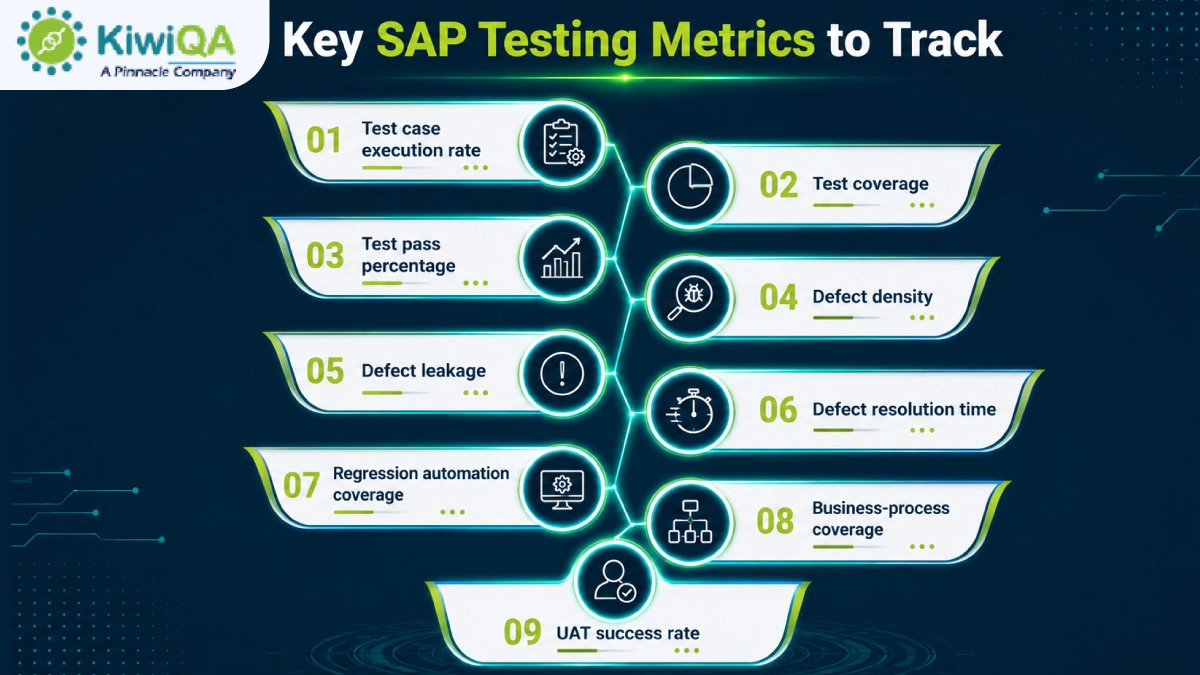
Key SAP Testing Metrics to Track

🢣 Test case execution rate- It calculates the number of planned test cases that have been run during a given testing period.

🢣 Test coverage- It demonstrates the extent to which the specified SAP features, specifications, or business procedures have been tested.

🢣 Test pass percentage- It shows the proportion of test cases that are successfully completed and produce the desired outcomes.

🢣 Defect density- It counts the number of flaws found in a particular SAP function, module, or testing area.

🢣 Defect leakage- It monitors flaws found in production or after release that were overlooked during testing.

🢣 Defect resolution time- It calculates the typical time needed to look into, correct, retest, and close reported defects.

Key SAP Testing Metrics to Track

🢣 Regression automation coverage- It displays the percentage of regression test cases that are repeatable and automated.

🢣 Business-process coverage- It evaluates the degree to which crucial end-to-end business processes have been verified during SAP testing.

🢣 UAT success rate- It shows the proportion of user acceptance tests that business users have successfully approved.

How Automation and AI Are Changing SAP Testing in 2026

◈ AI-Assisted Test Case Generation

AI can recommend appropriate test cases and scenarios by analyzing SAP requirements, business rules, and current documentation. This reduces manual tasks, increases coverage, and helps testers find missed conditions. AI-generated cases can then be reviewed and improved by human testers prior to execution.

◈ Intelligent Regression Testing

Intelligent regression testing determines which SAP functions are most likely to be impacted by updates. Teams can prioritize high-risk scenarios rather than running every test that is available. This keeps coverage of crucial business processes while reducing unnecessary execution.

◈ Self-Healing Test Automation

Self-healing automation can automatically modify test scripts to continue running when it detects specific changes in SAP interfaces or application components. When object properties or user interfaces change, this can reduce maintenance work.

◈ Predictive Defect Analysis

To find SAP areas that might have a higher defect risk, predictive defect analysis uses past testing data, change patterns, and defect trends. These insights can be used by teams to prioritize testing resources, concentrate reviews on vulnerable stages, and conduct research into possible problems earlier in the testing lifecycle.

Also Read : A Complete SaaS Testing Approach for Modern Businesses

How to Choose the Right SAP Testing Partner

☢ SAP domain expertise- Select a partner who has demonstrated expertise with SAP modules, business procedures, configurations, and testing techniques.

☢ S/4HANA testing experience– Check if they have tested custom developments, migrations, upgrades, and S/4HANA implementations.

☢ Test automation capabilities– To increase testing efficiency, find out if they can automate regression, high-volume, and repetitive test scenarios.

☢ Industry knowledge- Choose a partner who is knowledgeable about the operational procedures, business priorities, compliance requirements, and industry workflows.

☢ Integration testing expertise– Make sure they are able to test dependencies and data flows between SAP modules, middleware, APIs, and external apps.

☢ Performance and security testing capabilities- Look for knowledge of SAP performance, scalability, user access, authorization, and security control validation.

☢ Test framework maturity– Determine whether the partner makes use of defined procedures, reusable resources, structured testing frameworks, and measurable quality standards.

☢ Reporting and governance approach- Select a partner who offers regular stakeholder communication, risk visibility, test metrics, defect reporting, and clear dashboards.

☢ Ability to support continuous testing– Give preference to partners who can support continuous validation across SAP releases, updates, and modifications and incorporate testing into CI/CD pipelines.

Ready to Discuss Your SAP Testing Requirements?

Ready to Strengthen Your SAP Testing Process?

SAP performance depends on testing, which continues throughout the system lifecycle. SAP testing acts as the continuous business-risk validation process rather than final delivery. A structured SAP business process testing approach helps to protect critical processes, integrations, and user experience. Whether implementing, upgrading, or migrating SAP, choosing a skilled SAP testing company helps to establish scalable quality practices, minimize disruptions, and ensure the system remains reliable with changing business needs.

A Complete SaaS Testing Approach for Modern Businesses

SaaS apps are necessary to modern business workflows. The requirement for premium, consistent software rises along with the desire for cloud-driven solutions. More than 40% of firms report losing more than $1 million annually due to poor software quality. SaaS testing measures that your service matches performance, functionality, and security. SaaS Testing Services makes sure your software is in optimal condition before release. Read the blog to know a structured approach for modern business.

What Is SaaS Testing?

The process of confirming that a Software-as-a-Service application operates accurately, efficiently, maintains security, and provides a consistent user experience is known as SaaS testing. SaaS testing company ensures the application satisfies business needs and customer expectations both before and after deployment.  The testing is required for validating features, integrations, scalability, and reliability across various devices, browsers, and user environments.

Why Modern Businesses Need a SaaS Testing Approach

➥ Ensure Consistent Application Performance

To guarantee quick response times and stability, a robust SaaS testing strategy verifies application performance under various workloads. It keeps a dependable experience even during periods of high traffic by assisting in the early detection of slow pages, resource bottlenecks, and performance problems.

➥ Protect Customer and Business Data

SaaS application testing assists in locating security flaws, confirming access controls across several tenants, and validating user permissions. Frequent testing lowers security risks, safeguards private client and company information, and guarantees adherence to data privacy laws and industry standards.

➥ Deliver a Reliable User Experience

Testing boosts customer satisfaction and enhances long-term user retention by early detection of usability problems, broken workflows, and navigation issues.

➥ Support Continuous Product Updates

Businesses can confidently release new features without affecting current functionality when they have a clear SaaS testing strategy. Automated and regression testing for continuous validation facilitates quicker deployments, enhances software quality, and lowers the possibility of production flaws following each update.

Ready to Strengthen Your SaaS Testing Strategy?

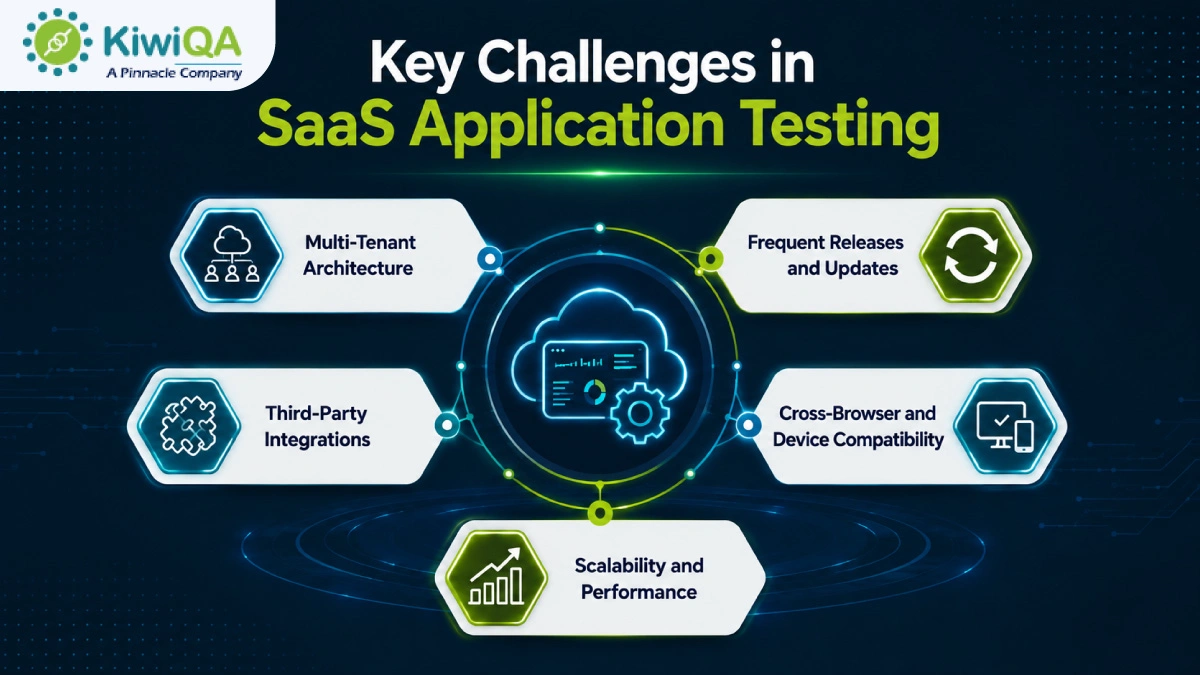
Key Challenges in SaaS Application Testing

◈ Multi-Tenant Architecture

One of the most difficult aspects of SaaS security testing is multi-tenant architecture, which allows several clients to share an application while maintaining data isolation. To stop unwanted access, testing should confirm user permissions, secure data separation, and tenant-specific configurations. Additionally, QA teams must confirm that changes made do not impact other customers’ data, functionality, or performance.

◈ Frequent Releases and Updates

Continuous testing is crucial because SaaS applications are updated often. In order to prevent defects from being introduced by new features and bug fixes, QA teams must manage shorter testing cycles while maintaining thorough regression coverage. Automated testing is essential for swiftly validating changes without postponing releases. A carefully planned testing procedure helps in maintaining software quality.

◈ Third-Party Integrations

Third-party services like payment gateways, CRMs, analytics platforms, and communication tools are essential to the majority of SaaS applications. Validating APIs, data synchronization, authentication, and system responses in various scenarios are all part of testing these integrations. Additionally, QA teams need to assess how the application responds to slow or unavailable external services. Reliable integration testing guarantees continuous business operations and avoids data inconsistencies.

◈ Cross-Browser and Device Compatibility

Compatibility testing is crucial because users access SaaS applications from a variety of browsers, devices, and OS. QA teams should confirm that desktop, tablet, and mobile platforms all have consistent functionality, layout, and performance. Prior to release, testing various screen sizes, browser versions, and operating systems helps in identifying display and usability issues. This guarantees that every customer, regardless of device, will have a smooth experience.

Key Challenges in SaaS Application Testing

◈ Scalability and Performance

SaaS platforms must continue to provide quick performance as customer demand increases. To find bottlenecks before they impact production, SaaS application testing should mimic growing user traffic, massive datasets, and peak workloads. Assessing response times, resource usage, and infrastructure performance helps guarantee that the application scales effectively. Thorough scalability testing helps businesses expand while preserving a stable user experience.

A Step-by-Step SaaS Testing Approach

Step 1: Understand Business and User Requirements

Every effective SaaS testing approach procedure begins with a thorough comprehension of user expectations and business objectives. Determine the most important workflows in the application, examine various user roles and permissions, and specify the behavior of each feature. Pay attention to high-risk features that have an immediate effect on revenue or customers. This foundation assists QA teams in developing suitable test cases and guaranteeing that the application provides the anticipated business value.

Step 2: Define the SaaS Testing Strategy

A carefully thought-out testing strategy guarantees that each testing task is in line with the project’s goals. Determine which areas need automated or manual testing, specify testing environments, establish criteria for each testing phase, and set clear testing goals. Throughout the SDLC, an organized approach guarantees that the SaaS application is assessed consistently. It enhances collaboration and minimizes testing gaps.

Also Read : Best 11 SaaS Testing Companies in India (Edition 2026)

Step 3: Prepare the Test Environment

To produce accurate results, a trustworthy test environment should closely mimic the production setup. Before execution starts, set up test accounts, user roles, permissions, and realistic datasets. To properly validate application behavior, integrate all necessary testing tools and supporting systems. In addition to increasing testing accuracy and decreasing false failures, proper environment preparation helps in identifying environment-specific problems prior to deployment.

Step 4: Design Test Scenarios and Test Cases

Well-designed test scenarios incorporate edge-case scenarios to verify how the application behaves in various scenarios. Give customer-critical processes like data processing, account management, and payments top priority. Reusable test cases increase productivity, facilitate regression testing, and lessen the work required for upcoming software releases.

Step 5: Execute Functional Testing

Functional testing, the SaaS testing methodology, confirms that each feature operates in accordance with technical and business requirements. Verify critical features like billing, dashboards, reports, notifications, subscription management, user registration, and login. Verify that workflows work properly on various devices and user roles. Early detection of functional flaws increases application performance and guarantees that users encounter consistent, expected behavior across the platform.

Step 6: Perform Integration and API Testing

Both these factors make a strong impact in modern SaaS applications. Check that data exchanges between connected systems, authentication, and API requests and responses function properly. Verify data accuracy, error management, and recovery procedures in the event that integrations are unsuccessful. Extensive integration testing guarantees that external services operate smoothly within the application ecosystem. It avoids communication problems and preserves data consistency.

Step 7: Conduct Performance and Scalability Testing

Performance QA measures the app’s performance under traffic. To evaluate response times, resource usage, and system stability, conduct load, stress, and endurance testing. Determine whether the platform can effectively scale as customer demand rises and find issues with performance before they have an impact on users. This QA guarantees long-term business growth and steady performance.

Step 8: Perform Security Testing

Sensitive client and corporate data is protected from possible threats by security testing. Verify encryption, authorization, authentication, and safe data transfer throughout the application. Prior to release, identify potential attack points, misconfigurations, and vulnerabilities. Verify adherence to relevant industry rules and security guidelines. Frequent security testing lowers the possibility of expensive security incidents and increases customer trust.

Step 9: Test Usability and Accessibility

Testing for usability and accessibility guarantees that the SaaS application is user-friendly for every client. Examine forms, buttons, interactive elements, navigation, and interface consistency across devices. Enhancing usability promotes user adoption and retention, along with customer satisfaction.

Step 10: Automate Regression Testing

Regression testing makes sure that new updates don’t cause flaws in the functionality that already exists. To increase testing consistency and speed, automate high-priority and repetitive test cases. Include automated tests in CI/CD pipelines so that they run following each significant change to the code. Maintain automation scripts on a regular basis to keep them reliable, cut down on manual labor, and speed up software release cycles.

Step 11: Conduct User Acceptance Testing

Before the application is deployed, SaaS user acceptance testing verifies that it satisfies actual business needs. Test real-world scenarios and business workflows with key customers, stakeholders, and business users. Obtain useful input, identify usability issues, and verify that the program meets functional requirements. A successful UAT lowers the possibility of post-release problems and boosts deployment confidence.

Step 12: Monitor the Application After Release

To preserve application quality, testing should continue even after deployment. Use real-time monitoring tools to maintain system availability, performance, failed transactions, and application errors. Examine production incidents and customer feedback to find areas for improvement. Maintaining software reliability, raising customer satisfaction, and supporting continuous product improvements can be obtained by regularly updating test cases.

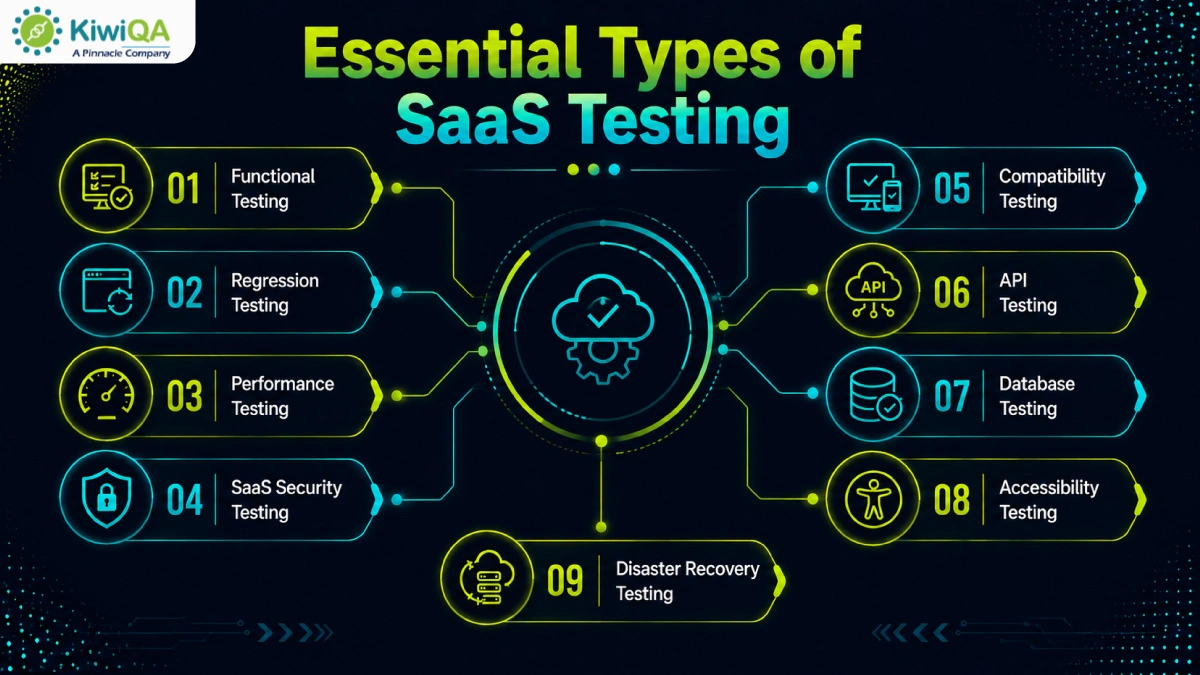
Essential Types of SaaS Testing

🢣 Functional Testing

Functional testing confirms that each feature of the application operates in accordance with the specified business requirements. To guarantee desired results, it assesses user workflows, system behavior, reports, and essential functionalities. This testing validates business logic across various scenarios and verifies that users can perform critical tasks without error. By guaranteeing consistent app performance, functional testing serves as the foundation of SaaS quality assurance.

🢣 Regression Testing

Regression testing makes sure that updates, bug fixes, and new features don’t interfere with existing functionality. After each code change, QA teams review crucial workflows to find unforeseen flaws. Regression tests are performed to increase consistency and speed. Frequent regression testing promotes quicker, faster software releases, lessens production problems, and maintains application stability.

Essential Types of SaaS Testing

🢣 Performance Testing

Performance testing evaluates a SaaS application’s responsiveness under various workloads. It assesses response times, throughput, resource usage, and general stability at high user traffic levels. In order to guarantee that the program can accommodate growing user numbers without experiencing performance issues, testing also confirms scalability. Early bottleneck identification contributes to a quicker and more responsive customer experience.

🢣 Security Testing

Vulnerabilities that may expose private company or client data are found through SaaS security testing. It verifies authorization, encryption, access controls, authentication, and protection against frequent online threats. Additionally, SaaS security testing guarantees adherence to industry standards. Frequent security evaluations lower risks, increase application resilience, and boost customer trust.

🢣 Compatibility Testing

Testing for compatibility guarantees that the SaaS application works reliably on a variety of devices, OS, browsers, and screen sizes. Before deployment, testing finds compatibility issues, display inconsistencies, and browser-specific problems. In a variety of user environments, this procedure enhances accessibility, usability, and customer satisfaction.

🢣 API Testing

API SaaS automated testing verifies the performance and functionality of application programming interfaces that link various systems. Additionally, API testing guarantees that integrations with third-party apps operate properly in various contexts. Early detection of API problems enhances system stability and avoids integration failures. It ensures accurate data exchange between linked services.

🢣 Database Testing

Database testing confirms that data is correctly processed, stored, and retrieved throughout the SaaS application. Database transactions, data consistency, integrity, and query performance are all validated. Additionally, testing verifies backup, restoration, and recovery protocols to safeguard vital business data. Reliable application operations are supported by efficient database testing, which lowers the risk of data loss.

🢣 Accessibility Testing

Accessibility testing guarantees that users of various abilities can utilize the application efficiently. In comparison to established accessibility standards, it assesses keyboard navigation, screen-reader compatibility, color contrast, content structure, and interactive elements. When necessary, this SaaS testing process supports legal compliance while enhancing usability for a wider audience.

🢣 Disaster Recovery Testing

The organization’s capacity to restore SaaS services following unanticipated disruptions is validated through disaster recovery testing. It confirms business continuity plans, recovery time goals, restoration protocols, and backup integrity. Frequent testing guarantees that vital systems and client data can be promptly restored with minimal downtime. An effective disaster recovery plan lessens the impact of unexpected events on business and increases operational resilience.

Also Read : Top 15 SaaS Testing Tools for Faster and Scalable QA in 2026

Manual Testing vs Automated Testing for SaaS Applications

❏ When to Use Manual Testing

For exploratory testing, usability evaluations, and the validation of recently created features, manual testing is the best option. It is especially helpful in complicated or dynamic workflows where human judgment is crucial. Usability problems, unexpected behaviors, and real-world user experience issues that automated scripts might find difficult to identify can be found through manual testing.

❏ When to Use Automated Testing

Regression testing, repeated test scenarios, cross-browser validation, API testing, performance testing, and CI/CD pipeline verification are the best uses for SaaS automated testing. Faster software releases and dependable validation following each code change are made possible by automation, which increases testing speed, consistency, and coverage while lowering manual labor.

❏ Building a Balanced Testing Model

Automation and manual testing are combined in an efficient model for SaaS testing strategy. Automate high-volume, repetitive, and stable test cases; for exploratory, usability, and customer-focused assessments, use manual testing. To maximize software quality, regularly assess automation coverage and match testing initiatives with business priorities.

Ready to Build a Reliable SaaS Testing Roadmap?

Build a Reliable SaaS Product with the Right Testing Approach

As the demand for SaaS apps is growing and the necessity for robust & comprehensive QA is rising. From validating scalability & security to optimizing performance and user experience, SaaS QA is integral to managing the quality & app integrity. By adopting these necessary practices, businesses can safeguard their app. Collaborate with a SaaS testing company to keep your app ready for 2026 and beyond.