A Complete SaaS Testing Approach for Modern Businesses

SaaS apps are necessary to modern business workflows. The requirement for premium, consistent software rises along with the desire for cloud-driven solutions. More than 40% of firms report losing more than $1 million annually due to poor software quality. SaaS testing measures that your service matches performance, functionality, and security. SaaS Testing Services makes sure your software is in optimal condition before release. Read the blog to know a structured approach for modern business.

What Is SaaS Testing?

The process of confirming that a Software-as-a-Service application operates accurately, efficiently, maintains security, and provides a consistent user experience is known as SaaS testing. SaaS testing company ensures the application satisfies business needs and customer expectations both before and after deployment.  The testing is required for validating features, integrations, scalability, and reliability across various devices, browsers, and user environments.

Why Modern Businesses Need a SaaS Testing Approach

➥ Ensure Consistent Application Performance

To guarantee quick response times and stability, a robust SaaS testing strategy verifies application performance under various workloads. It keeps a dependable experience even during periods of high traffic by assisting in the early detection of slow pages, resource bottlenecks, and performance problems.

➥ Protect Customer and Business Data

SaaS application testing assists in locating security flaws, confirming access controls across several tenants, and validating user permissions. Frequent testing lowers security risks, safeguards private client and company information, and guarantees adherence to data privacy laws and industry standards.

➥ Deliver a Reliable User Experience

Testing boosts customer satisfaction and enhances long-term user retention by early detection of usability problems, broken workflows, and navigation issues.

➥ Support Continuous Product Updates

Businesses can confidently release new features without affecting current functionality when they have a clear SaaS testing strategy. Automated and regression testing for continuous validation facilitates quicker deployments, enhances software quality, and lowers the possibility of production flaws following each update.
Ready to Strengthen Your SaaS Testing Strategy?

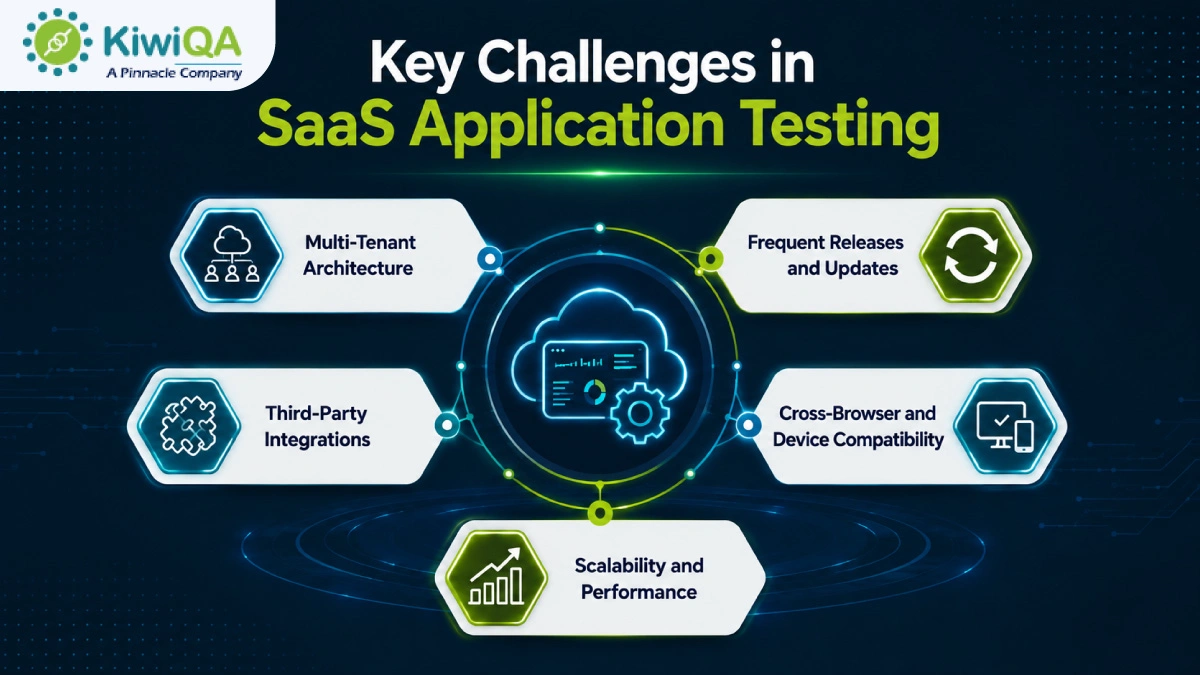
Key Challenges in SaaS Application Testing

◈ Multi-Tenant Architecture

One of the most difficult aspects of SaaS security testing is multi-tenant architecture, which allows several clients to share an application while maintaining data isolation. To stop unwanted access, testing should confirm user permissions, secure data separation, and tenant-specific configurations. Additionally, QA teams must confirm that changes made do not impact other customers’ data, functionality, or performance.

◈ Frequent Releases and Updates

Continuous testing is crucial because SaaS applications are updated often. In order to prevent defects from being introduced by new features and bug fixes, QA teams must manage shorter testing cycles while maintaining thorough regression coverage. Automated testing is essential for swiftly validating changes without postponing releases. A carefully planned testing procedure helps in maintaining software quality.

◈ Third-Party Integrations

Third-party services like payment gateways, CRMs, analytics platforms, and communication tools are essential to the majority of SaaS applications. Validating APIs, data synchronization, authentication, and system responses in various scenarios are all part of testing these integrations. Additionally, QA teams need to assess how the application responds to slow or unavailable external services. Reliable integration testing guarantees continuous business operations and avoids data inconsistencies.

◈ Cross-Browser and Device Compatibility

Compatibility testing is crucial because users access SaaS applications from a variety of browsers, devices, and OS. QA teams should confirm that desktop, tablet, and mobile platforms all have consistent functionality, layout, and performance. Prior to release, testing various screen sizes, browser versions, and operating systems helps in identifying display and usability issues. This guarantees that every customer, regardless of device, will have a smooth experience.
Key Challenges in SaaS Application Testing

◈ Scalability and Performance

SaaS platforms must continue to provide quick performance as customer demand increases. To find bottlenecks before they impact production, SaaS application testing should mimic growing user traffic, massive datasets, and peak workloads. Assessing response times, resource usage, and infrastructure performance helps guarantee that the application scales effectively. Thorough scalability testing helps businesses expand while preserving a stable user experience.

A Step-by-Step SaaS Testing Approach

Step 1: Understand Business and User Requirements

Every effective SaaS testing approach procedure begins with a thorough comprehension of user expectations and business objectives. Determine the most important workflows in the application, examine various user roles and permissions, and specify the behavior of each feature. Pay attention to high-risk features that have an immediate effect on revenue or customers. This foundation assists QA teams in developing suitable test cases and guaranteeing that the application provides the anticipated business value.

Step 2: Define the SaaS Testing Strategy

A carefully thought-out testing strategy guarantees that each testing task is in line with the project’s goals. Determine which areas need automated or manual testing, specify testing environments, establish criteria for each testing phase, and set clear testing goals. Throughout the SDLC, an organized approach guarantees that the SaaS application is assessed consistently. It enhances collaboration and minimizes testing gaps.

Also Read : Best 11 SaaS Testing Companies in India (Edition 2026)

Step 3: Prepare the Test Environment

To produce accurate results, a trustworthy test environment should closely mimic the production setup. Before execution starts, set up test accounts, user roles, permissions, and realistic datasets. To properly validate application behavior, integrate all necessary testing tools and supporting systems. In addition to increasing testing accuracy and decreasing false failures, proper environment preparation helps in identifying environment-specific problems prior to deployment.

Step 4: Design Test Scenarios and Test Cases

Well-designed test scenarios incorporate edge-case scenarios to verify how the application behaves in various scenarios. Give customer-critical processes like data processing, account management, and payments top priority. Reusable test cases increase productivity, facilitate regression testing, and lessen the work required for upcoming software releases.

Step 5: Execute Functional Testing

Functional testing, the SaaS testing methodology, confirms that each feature operates in accordance with technical and business requirements. Verify critical features like billing, dashboards, reports, notifications, subscription management, user registration, and login. Verify that workflows work properly on various devices and user roles. Early detection of functional flaws increases application performance and guarantees that users encounter consistent, expected behavior across the platform.

Step 6: Perform Integration and API Testing

Both these factors make a strong impact in modern SaaS applications. Check that data exchanges between connected systems, authentication, and API requests and responses function properly. Verify data accuracy, error management, and recovery procedures in the event that integrations are unsuccessful. Extensive integration testing guarantees that external services operate smoothly within the application ecosystem. It avoids communication problems and preserves data consistency.

Step 7: Conduct Performance and Scalability Testing

Performance QA measures the app’s performance under traffic. To evaluate response times, resource usage, and system stability, conduct load, stress, and endurance testing. Determine whether the platform can effectively scale as customer demand rises and find issues with performance before they have an impact on users. This QA guarantees long-term business growth and steady performance.

Step 8: Perform Security Testing

Sensitive client and corporate data is protected from possible threats by security testing. Verify encryption, authorization, authentication, and safe data transfer throughout the application. Prior to release, identify potential attack points, misconfigurations, and vulnerabilities. Verify adherence to relevant industry rules and security guidelines. Frequent security testing lowers the possibility of expensive security incidents and increases customer trust.

Step 9: Test Usability and Accessibility

Testing for usability and accessibility guarantees that the SaaS application is user-friendly for every client. Examine forms, buttons, interactive elements, navigation, and interface consistency across devices. Enhancing usability promotes user adoption and retention, along with customer satisfaction.

Step 10: Automate Regression Testing

Regression testing makes sure that new updates don’t cause flaws in the functionality that already exists. To increase testing consistency and speed, automate high-priority and repetitive test cases. Include automated tests in CI/CD pipelines so that they run following each significant change to the code. Maintain automation scripts on a regular basis to keep them reliable, cut down on manual labor, and speed up software release cycles.

Step 11: Conduct User Acceptance Testing

Before the application is deployed, SaaS user acceptance testing verifies that it satisfies actual business needs. Test real-world scenarios and business workflows with key customers, stakeholders, and business users. Obtain useful input, identify usability issues, and verify that the program meets functional requirements. A successful UAT lowers the possibility of post-release problems and boosts deployment confidence.

Step 12: Monitor the Application After Release

To preserve application quality, testing should continue even after deployment. Use real-time monitoring tools to maintain system availability, performance, failed transactions, and application errors. Examine production incidents and customer feedback to find areas for improvement. Maintaining software reliability, raising customer satisfaction, and supporting continuous product improvements can be obtained by regularly updating test cases.

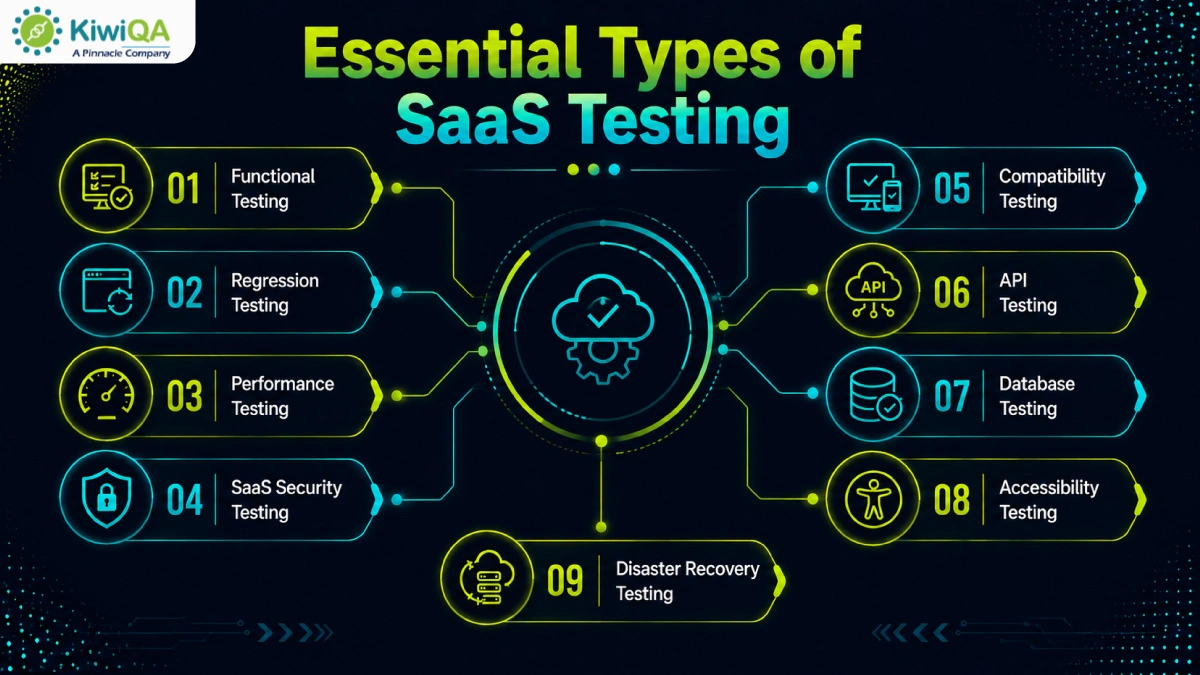
Essential Types of SaaS Testing

🢣 Functional Testing

Functional testing confirms that each feature of the application operates in accordance with the specified business requirements. To guarantee desired results, it assesses user workflows, system behavior, reports, and essential functionalities. This testing validates business logic across various scenarios and verifies that users can perform critical tasks without error. By guaranteeing consistent app performance, functional testing serves as the foundation of SaaS quality assurance.

🢣 Regression Testing

Regression testing makes sure that updates, bug fixes, and new features don’t interfere with existing functionality. After each code change, QA teams review crucial workflows to find unforeseen flaws. Regression tests are performed to increase consistency and speed. Frequent regression testing promotes quicker, faster software releases, lessens production problems, and maintains application stability.
Essential Types of SaaS Testing

🢣 Performance Testing

Performance testing evaluates a SaaS application’s responsiveness under various workloads. It assesses response times, throughput, resource usage, and general stability at high user traffic levels. In order to guarantee that the program can accommodate growing user numbers without experiencing performance issues, testing also confirms scalability. Early bottleneck identification contributes to a quicker and more responsive customer experience.

🢣 Security Testing

Vulnerabilities that may expose private company or client data are found through SaaS security testing. It verifies authorization, encryption, access controls, authentication, and protection against frequent online threats. Additionally, SaaS security testing guarantees adherence to industry standards. Frequent security evaluations lower risks, increase application resilience, and boost customer trust.

🢣 Compatibility Testing

Testing for compatibility guarantees that the SaaS application works reliably on a variety of devices, OS, browsers, and screen sizes. Before deployment, testing finds compatibility issues, display inconsistencies, and browser-specific problems. In a variety of user environments, this procedure enhances accessibility, usability, and customer satisfaction.

🢣 API Testing

API SaaS automated testing verifies the performance and functionality of application programming interfaces that link various systems. Additionally, API testing guarantees that integrations with third-party apps operate properly in various contexts. Early detection of API problems enhances system stability and avoids integration failures. It ensures accurate data exchange between linked services.

🢣 Database Testing

Database testing confirms that data is correctly processed, stored, and retrieved throughout the SaaS application. Database transactions, data consistency, integrity, and query performance are all validated. Additionally, testing verifies backup, restoration, and recovery protocols to safeguard vital business data. Reliable application operations are supported by efficient database testing, which lowers the risk of data loss.

🢣 Accessibility Testing

Accessibility testing guarantees that users of various abilities can utilize the application efficiently. In comparison to established accessibility standards, it assesses keyboard navigation, screen-reader compatibility, color contrast, content structure, and interactive elements. When necessary, this SaaS testing process supports legal compliance while enhancing usability for a wider audience.

🢣 Disaster Recovery Testing

The organization’s capacity to restore SaaS services following unanticipated disruptions is validated through disaster recovery testing. It confirms business continuity plans, recovery time goals, restoration protocols, and backup integrity. Frequent testing guarantees that vital systems and client data can be promptly restored with minimal downtime. An effective disaster recovery plan lessens the impact of unexpected events on business and increases operational resilience.

Also Read : Top 15 SaaS Testing Tools for Faster and Scalable QA in 2026

Manual Testing vs Automated Testing for SaaS Applications

❏ When to Use Manual Testing

For exploratory testing, usability evaluations, and the validation of recently created features, manual testing is the best option. It is especially helpful in complicated or dynamic workflows where human judgment is crucial. Usability problems, unexpected behaviors, and real-world user experience issues that automated scripts might find difficult to identify can be found through manual testing.

❏ When to Use Automated Testing

Regression testing, repeated test scenarios, cross-browser validation, API testing, performance testing, and CI/CD pipeline verification are the best uses for SaaS automated testing. Faster software releases and dependable validation following each code change are made possible by automation, which increases testing speed, consistency, and coverage while lowering manual labor.

❏ Building a Balanced Testing Model

Automation and manual testing are combined in an efficient model for SaaS testing strategy. Automate high-volume, repetitive, and stable test cases; for exploratory, usability, and customer-focused assessments, use manual testing. To maximize software quality, regularly assess automation coverage and match testing initiatives with business priorities.

Ready to Build a Reliable SaaS Testing Roadmap?

Build a Reliable SaaS Product with the Right Testing Approach

As the demand for SaaS apps is growing and the necessity for robust & comprehensive QA is rising. From validating scalability & security to optimizing performance and user experience, SaaS QA is integral to managing the quality & app integrity. By adopting these necessary practices, businesses can safeguard their app. Collaborate with a SaaS testing company to keep your app ready for 2026 and beyond.

Top 15 SaaS Testing Tools for Faster and Scalable QA in 2026

It’s difficult to overlook the growth of SaaS. By 2026, the world’s SaaS market is expected to reach $465 billion, with 84% of organizations saying they were spending more on SaaS in 2025. This kind of growth comes with its fair share of demands, and this one is no different: demanding fast, continuous, and scalable quality assurance.

Today’s teams are developing and deploying SaaS inside a CI/CD pipeline, microservices architecture, and distributed remote environments. These environments are not the normal QA environments. When shipping code 5 times a day, you can’t run a regression test every weekend. SaaS testing services should keep up with today’s development speed and complexity. Whether you’re a QA lead evaluating new tools or a startup trying to build a reliable testing pipeline from scratch, this list of 15 tools gives you a clear, practical starting point.

What Are SaaS Testing Tools?

SaaS testing tools are cloud-based platforms that allow teams to test software applications without having to maintain any infrastructure. Access them via a browser, hook them up to your pipelines, and run tests without installing or setting up a server.

The accessibility and scale are what make them different from traditional tools. Traditional testing approaches, such as the early Selenium test frameworks, had teams running local testing grids, manually setting up environments, and manually obtaining devices. All of that is done in the cloud with SaaS Testing Services.

Cloud-based access means your QA engineer in Bangalore and your developer in Berlin work from the same environment. Scalability allows you to perform thousands of parallel tests without having to purchase additional hardware. Pay-as-you-go models, which reduce idle infrastructure, contribute to cost efficiency. Additionally, its integration features ensure it fits seamlessly into your team’s existing GitHub Actions, Jenkins, or other CI/CD pipelines.

Key Features to Look for in SaaS Testing Tools

Not all tools are created equal or are suitable for all teams.

➥ SaaS automated testing forces you to manually write and maintain brittle scripts, which is going to hinder you, rather than help you. Watch out for smart recorders, codeless platforms, or test generation with AI.

➥ For SaaS application testing, cross-browser and cross-device testing are more important than most teams realize. This is because users may be on Safari on an iPhone, Chrome on Windows, or Firefox on Linux, and all need to be covered.

➥ In 2026, CI/CD integration is a must-have. Your testing tool should be able to integrate with your deployment workflow, which means that you should be able to set it up to automatically run your tests on each commit or pull request.

➥ AI-driven testing and self-healing capabilities significantly lower maintenance costs. Live monitoring panels supply instant visibility into quality status for the entire team, including programmers, testers, and merchandise supervisors.

➥ Remote squads remain aligned through cooperative functions. Protection and compliance support ensure the safety and security of your organization’s system as well as its clientele.

 Ready to Scale QA with Smart SaaS Testing Solutions?

Types of SaaS Testing Tools

The best SaaS testing company is the one that your team is using on a regular basis, not the one with the most features on a comparison chart.

🢣 Functional Testing Tools

Verify your application’s performance through user flows, business logic, and UI interactions. These are your workhorses for regression and end-to-end testing.

🢣 Performance Testing Tools

Manage load, stress, and scalability scenarios. They ask things such as: Is your platform able to support 10,000 concurrent users? What breaks first under peak traffic?

🢣 API Testing Tools

Make sure that your APIs deliver the correct information, manage errors effectively, perform authentication correctly, and meet performance standards. With the increasingly API-heavy nature of today’s SaaS applications, this is a feature that should be highlighted separately.

🢣 Visual/UI Testing Tools

Capture layout regressions, rendering inconsistencies, and visual bugs, which functional testing tools completely miss. Users will get frustrated when the button they are pressing is broken, but still “works”.

🢣 Test Management Tools

Manage your QA processes, test cases, runs, results, defects, and more, and keep all of it traceable and audit-ready, which is critical for regulated sectors.

Also Read : Top AI Testing Tools Decision Makers Should Invest in 2026

Top 15 SaaS Testing Tools for 2026

It’s all about size, stack, budget, and velocity of your team. First, identify your largest pain point (flaky tests, slow feedback loop, lack of API coverage, security gaps, etc) and then find a tool that fits that problem. Build from there.

1. Virtuoso QA

Virtuoso QA

Virtuoso QA is an AI-native web testing platform, designed from the ground up for natural language programming instead of an AI overlay on a legacy platform. Tests are written in natural language, and Virtuoso takes care of interactions with the UI, API responses, and database validation all in one composable journey. New tests are automatically adapted when your application changes, instead of waiting for an engineer to update the locators. It supports 2,000+ OS and browser combinations, and is SOC 2 Type 2 certified. Ideal for large enterprise teams requiring a single end-to-end solution, without coding.

2. CloudQA

CloudQA

CloudQA is a codeless cloud regression testing platform that allows you to automate your user flows without coding at all. It supports interactions through its smart browser recorder, and can generate test cases from live URLs and mockups using its AI capabilities. Data-driven testing through CSV uploads provides a much wider coverage. Ideal for agile teams and business analysts who want to scale with the best SaaS testing tools without the infrastructure nightmares.

3. BugBug.io

BugBug.io

BugBug.io is a low-code browser testing tool and a more modern, user-friendly way of testing web-based applications than older model recorder-based tools. It has a sleek Chrome extension recorder and window-based visual test editing. Additionally, it has the ability to schedule tests from the cloud and a flat-rate pricing with unlimited seats, which makes budgeting a breeze. The best software testing tools for SaaS startups are ideal for startups and SMBs that require fast and accurate web regression suites without the complexity.

4. Mabl

Mabl

Mabl is a low-code AI-powered platform designed for continuous delivery. It has a machine learning layer that keeps building intelligence from all test runs, ensuring test stability in the face of an evolving app. All UI interactions and API validation are covered in a single Mabl test, and accessibility checks are performed in conjunction with functional tests for every test run. Moreover, native CI/CD triggers execute test suites automatically for each code commit. Suitable for teams that are developer-focused and prefer automated test maintenance to be part of their deployment pipelines.

5. TestSprite

TestSprite

TestSprite is a completely self-contained AI testing agent that runs directly within the latest code editors through Model Context Protocol (MCP) servers. It generates test cases, writes the code, and creates cloud sandboxes on the fly. Other than that, it also runs tests and makes recommendations for bug fixes without needing a QA engineer to write a single line of test code. Ideal for engineering teams with limited resources who must rapidly test the output of AI-generated code in conjunction with the frontend and backend.

6. SoapUI

SoapUI

SoapUI has become the standard in API testing, as it supports comprehensive API mocking, data-driven API test coverage, and testing for security vulnerabilities on API endpoints. If your SaaS platform is extensively integrated with other systems, payment gateways, 3rd party systems, or internal microservices, then your backend team needs the depth of SoapUI. Ideal for QA engineers who need to deal with complex, layered API ecosystems.

7. Qodex.ai

Qodex.ai

Qodex.ai is an AI-powered automation suite that connects manual exploratory testing and fully automated suites. It automatically infers user behavior, anticipates corner cases, and transforms cumbersome manual workflows into automated scripts across platforms with little to no human intervention. Ideal for SaaS businesses whose growth is accelerating and requires more tests with fewer engineers.

8. Aqua Cloud

Aqua Cloud

Aqua Cloud is a test management platform and enterprise-grade Application Lifecycle Management (ALM) enhanced with AI capabilities. It combines manual testing, an automated framework, and defect tracking in a single location. Additionally, it can automate the creation of test steps from requirements documents or user stories, saving hours on test planning. These SaaS performance testing tools are created for traceability and compliance mapping in heavily regulated sectors such as FinTech and healthcare.

9. BrowserStack

BrowserStack

BrowserStack is a widely adopted testing platform, recognized for its cross-browser and device coverage and a growing investment in AI-powered automation. It has launched AI agents such as the Test Case Generator, the Low-Code Authoring Agent, the Self-Healing Agent, and the Visual Review Agent. It’s an execution environment, not a test creation tool. You simply execute your existing Playwright, Cypress, or Selenium tests on BrowserStack’s infrastructure. It’s the best for cross-platform teams that are concerned about real-world device accuracy.

10. QASource

QASource

QASource combines the skills of expert QA services with custom automation frameworks that cater to your tech stack. It provides you with a specialized engineering team that can quickly ramp up your testing capacity without hiring. Ideal for medium and large companies needing to rapidly ramp up QA without starting their own team from scratch.

11. Cledara

Cledara

Cledara’s mission is to manage an SaaS operational stack, not code-level testing. It offers real-time software usage, software licenses, security permissions, and operational health for all your SaaS applications. It is best suited to IT operations and DevOps leads who struggle with tool sprawl and compliance tracking in large software stacks in their organizations.

12. k6 (by Grafana)

k6 (by Grafana)

K6 should be a DevOps Engineer/SRE’s best friend when dealing with scalable microservices. Using JavaScript to write tests, the developers can easily write realistic performance tests in pipelines to ensure no performance regressions in production. It’s not just about the use of the best testing tools for SaaS products to benchmark the login endpoints with synthetic traffic; it’s about simulating user patterns that actually occur in these systems. This includes browsing, searching, creating records, running reports, and so on.

13. Qase

Qase

Qase is a simple-to-use, cloud-based Test Case Management solution. It has AI-driven test case generation, collaborative test case libraries, live test case run monitoring, and native integrations with Jira, GitHub, and Slack. Perfect for QA leaders seeking one place for all of their manual and automated test strategies from distributed teams.

14. Sauce Labs

Sauce Labs

Sauce Labs released its AI for Insights in November 2025, which includes a range of smarter analytics for test failures, flakiness trends, and test execution trends. It enables massive parallel test execution of real devices, emulators/simulators, and has video logs and root cause analysis for any broken pipelines. It also includes data facilities that are situated in Europe with GDPR compliant staff. Best suited to large-scale continuous integration (CI), in which a large number of tests, typically thousands, are executed simultaneously every day.

15. Applitools

Applitools

Applitools is one of the best SaaS testing tools for businesses looking to improve SaaS application testing with AI-powered visual automation. The platform supports SaaS automated testing by helping teams detect UI inconsistencies, visual bugs, and cross-browser issues with greater accuracy and speed. As part of a strong SaaS testing strategy, Applitools enhances quality assurance workflows for modern cloud applications while supporting scalable SaaS testing services. It is also widely used alongside SaaS performance testing tools and SaaS security testing processes to ensure reliable and seamless user experiences for growing businesses and SaaS startups.

How to Choose the Right SaaS Testing Tool

Choosing the right tool starts with being honest about your team’s actual situation and not its ideal state.

If the startup is 5 people, it is not necessary to have a full traceability workflow in an enterprise ALM platform. For a 200-person engineering organization, a lightweight browser recorder isn’t enough. Find the balance between the intricacy of the tool and your team’s capacity regarding operating plus retaining said software.

The next is the complexity of the project. When your SaaS application is deeply API dependent, is built of microservices, has a multi-tenant architecture, and copiously uses third-party integrations, you need a tool (or a set of tools) that can access all these layers. Do not go with a UI only recorder.

The Budget is real. Most tools have different pricing tiers, but enterprise plans are usually custom-made. Consider not only the cost of the license, but also the hours those personnel must devote to configuring, training, and sustaining operations.

A good SaaS testing strategy also considers integration requirements. A tool that fits into your existing CI/CD pipeline, bug tracker, and communication stack without friction is the best one to use, as it is the one that your team will actually use. Lastly, scalability means can this tool scale with you if your test suite doubles and your user base triples?

Also Read : Best SaaS Testing Platforms Transforming QA Operations in 2026

Benefits of Using SaaS Testing Tools in 2026

The need for investing in dedicated SaaS testing tools, i.e., becoming more and more compelling year after year. Continuous, automated testing that can be integrated into the pipeline can open the door to faster release cycles. This trend is not to be taken lightly, as the automated testing market is projected to reach $55.2 billion by 2030, up from $24.7 billion in 2023.

When it comes to infrastructure, it’s a no-brainer that cloud-based execution will lower the bill, which means no more purchasing server racks or running device labs. More collaboration occurs when dashboards and reports are available to anyone, not sitting on a shared drive inside a QA team. Better test coverage is achieved by parallel execution and AI-driven test generation. Continuous testing support results in quality being integrated throughout the lifecycle and not tacked on at the end.

Common Challenges and How to Overcome Them

The same few issues come up with every team when they’re trying to establish a SaaS testing practice.

❏ Tool Overload : Tool overload creates a scatter plot effect and drives up the cost. The solution is consolidation: review all your team’s tools, look out for overlapping functionality, and strive for one-stop platforms that address multiple requirements.

❏ Learning Curve : Learning curve kills adoption. Teams are overwhelmed with too many new tools at once. People can remain productive during transitions with role-specific training paths, in-app guidance, and a gradual rollout, one automated step at a time.

❏ Integration Issues: SaaS security testing deserves its own continuous pipeline. Multi-tenant architectures allow data to be exposed to multiple customers at once when a vulnerability occurs. Ensure that the static code analysis, dependency scanning, and dynamic application security testing are all built into the CI/CD process, so that the vulnerabilities can be identified during the app’s development, rather than in production. SaaS security testing that takes place periodically rather than continuously will always be one sprint behind.

❏ Data Security Concerns : When tools don’t communicate with one another, integration problems cause delays. Go for the platforms that have well-maintained and documented integrations for your stack. When it comes to data security, it’s best to select platforms that are SOC 2, ISO 27001, or have compliance certification built in, rather than tacked on.

Future Trends in SaaS Testing

AI-powered and self-healing tests are already available; for instance, Virtuoso QA and Mabl will automatically modify tests as the UI changes, reducing maintenance time dramatically. In 2023, more than one-third of large businesses have already begun adopting machine learning in their QA processes to shorten test cycles and catch bugs earlier in the process.

Low-code and no-code automation is making QA accessible to non-developers: product managers, business analysts, and subject matter experts can participate in test coverage without coding. Shift-left and shift-right testing push quality earlier into development and later into production monitoring simultaneously. Security testing has now become a first-class citizen in CI/CD pipelines as opposed to a periodic audit. But autonomous QA systems, those that create, run, analyze, and correct tests with little or no human intervention, are transitioning from experimental to the production stage.

Ready to Discuss Your SaaS Testing Requirements?

Ready to Scale Your QA? Find the Perfect SaaS Testing Solution Today

From $4.07 billion in 2025 to $4.64 billion in 2026, the SaaS testing tools market is projected to grow at 14.1% CAGR, and that growth is more than just hype – it’s a business requirement. A one-man QA team in a startup company is not the same as an enterprise that has a QA team shipping to regulated markets. All teams have one thing in common: They all need speed, reliability, and scalable coverage.

Partnering with a reliable SaaS testing company may help to speed up the evaluation procedure, particularly if you need to establish a testing practice from scratch and are still shipping a product.